

How to clean a database / tables
This article explains how to clean a Demander database and its tables. The procedure removes a company’s data or clears a specific table, as needed.
Before you start
Section titled “Before you start”Open Database / table cleanup with a user who has permission for the company you want.
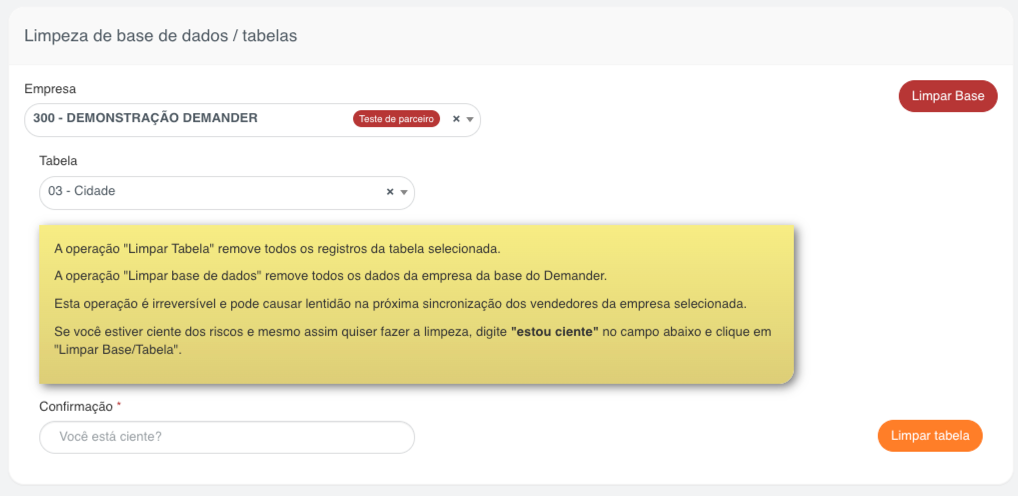
In the image, company 300 - DEMONSTRAÇÃO DEMANDER has status Partner test, and table 03 - City is selected. The data is illustrative; always check the company and the table of your operation.
Cleanup removes records of the selected company. It does not delete the structure of the system tables. The next sync of that company’s salespeople may be slow, as the screen warns.
| Operation | Can it run in Production? | Condition |
|---|---|---|
| Full database cleanup | No | For this procedure, ask support to set the company status to Tests. |
| Cleanup of a specific table | Yes, with restrictions | The table must be available for cleanup. Customer and Order cannot be cleaned in Production. |
Full database cleanup
Section titled “Full database cleanup”For a full cleanup, the company must have status Tests. If it is in Production, ask support to change the status before you start.
The Clear database button is available on the screen for Demander team users and partners, according to the status of the selected company. If you do not have access to that option, ask support for help.
- Open https://sistema.demander.com.br/limpar-base.
- In Company, find and select the company whose data will be removed.
- Confirm with support that the company has status Tests.
- Check the company again and read the warnings on the screen.
- In Confirmation, type exactly
estou ciente. - Click Clear database.
- Wait for processing and check the completion message for the selected company.
For a full cleanup you do not need to choose a table. Clear database cleans the tables covered by the procedure, even if a table is selected on the form.
Cleanup of specific tables
Section titled “Cleanup of specific tables”When you only need to clean one table, the company can stay in Production, as long as that table allows the operation.
- Open https://sistema.demander.com.br/limpar-base.
- If Company is available, find and select the company. For users linked to one company, the operation uses the signed-in user’s company.
- In Table, select the table you want to clean. The list shows only tables enabled for cleanup.
- Check the selected company and table and read the warnings on the screen.
- In Confirmation, type exactly
estou ciente. - Click Clear table.
- Wait for processing and check the completion message.
The procedure removes every record of the selected table that belongs to the company, not a single record or a filtered set. To clean more than one table, repeat the operation for each one, checking the selection each time.
When cleanup of the Order table is allowed, the company’s order items are removed as well.
Example scenarios
Section titled “Example scenarios”Restart the data of a test company
Section titled “Restart the data of a test company”Company Alfa, in Tests, needs to restart the database used in the rollout. The person in charge selects Alfa, checks the status, types estou ciente and uses Clear database. The data covered by the cleanup is removed; salespeople and other data protected by the system are kept.
Clean only one enabled table
Section titled “Clean only one enabled table”Company Beta, in Production, needs to remove every record of a table available in the list, other than Customer or Order. The person in charge selects Beta and the table, types estou ciente and uses Clear table. The company can stay in Production and the operation is limited to the selected table.
Trying to clean customers in Production
Section titled “Trying to clean customers in Production”Company Gama is in Production and needs to clean the Customer table. The system blocks that operation. The person in charge must contact support to review the need and the conditions of the cleanup.
Frequently asked questions
Section titled “Frequently asked questions”Do I need to change the status to clean a specific table?
Section titled “Do I need to change the status to clean a specific table?”In general, no. Cleanup of enabled tables can run in Production, except the Customer and Order tables, which are blocked in that status.
Why doesn’t the Clear database button appear?
Section titled “Why doesn’t the Clear database button appear?”The option depends on the user profile and the status of the selected company. It is shown to Demander team users and partners in the statuses the screen allows. If the company is in Production or you do not have access to the option, contact support.
Why isn’t the table I want on the list?
Section titled “Why isn’t the table I want on the list?”The list contains only tables the system enables for cleanup. If the table does not appear, contact support.
What should I type in Confirmation?
Section titled “What should I type in Confirmation?”Type exactly estou ciente, in lowercase and without quotes. That confirmation is required both for Clear database and for Clear table.
Can I undo the cleanup from the screen?
Section titled “Can I undo the cleanup from the screen?”No. The screen does not offer a way to undo the operation. Review whether the cleanup is needed before you confirm, and contact support beforehand if you are unsure about recovering the data.
Does the cleanup delete the company?
Section titled “Does the cleanup delete the company?”No. The procedure clears the records covered by the operation in the selected company. It is not a deletion of the company record.