

Sales Action Concept
This article aims to explain the concept of sales action. This functionality is only available for Demander Android.
Definition
Section titled “Definition”Sales action is used to record actions performed by the salesperson on the customer. E.g.: placed a display at the entrance of the store to increase sales.
How to register
Section titled “How to register”To use the sales action, you must first register the types of sales action . To find out more, access the article Registering Types of Sales Action.
Afterwards, the button for Demander Android must be enabled (made visible) as shown in the figure below.
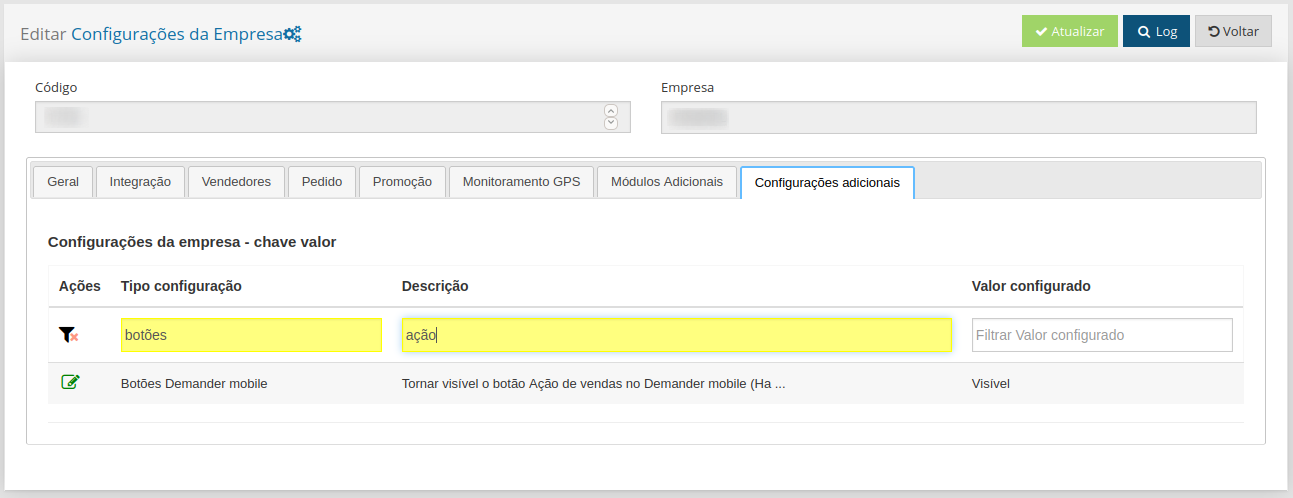
After these steps, the seller will have access to the “Sales Actions” button where he can register or edit an action. To find out more, access the article Creating Sales Action.
Integration
Section titled “Integration”Integration can be done using the tables below: