

Price List Concept
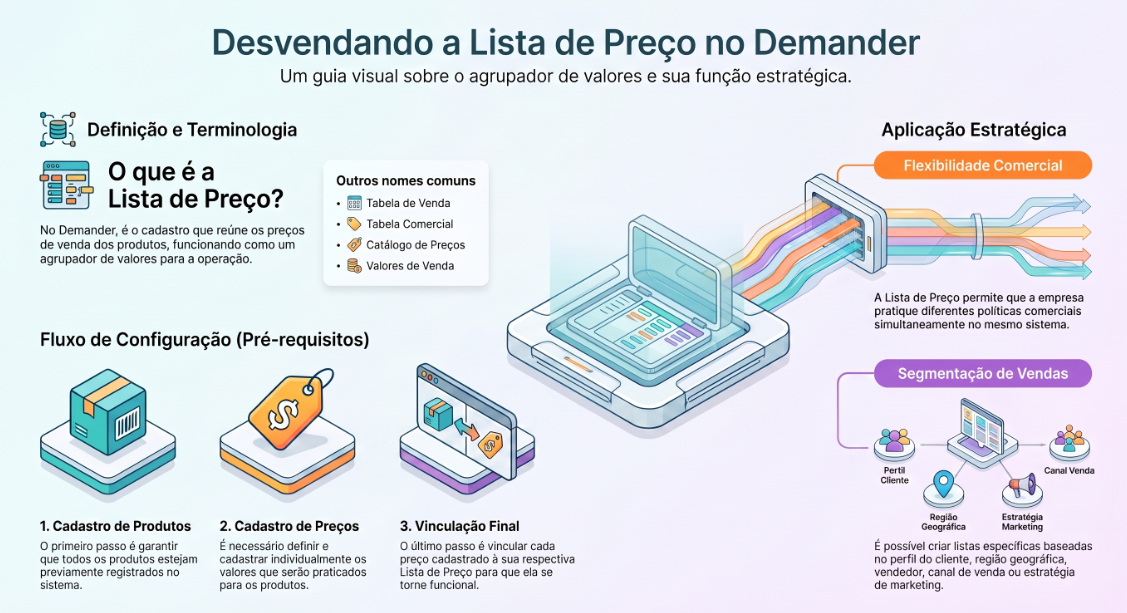
Similar terms
Section titled “Similar terms”Depending on the company or commercial context, a Price List may also be known as:
- Sales Prices
- Selling Values
- Sales Table
- Commercial Table
- Catalog
- Price Catalog
What is a Price List?
Section titled “What is a Price List?”In Demander, we use the term “Price List” to identify the record that brings together the selling prices of products.
It is important to emphasize that a Price List on its own is just a registration and does not have independent functionality. In order to be used, it must be linked to other system records.
What is required to use a Price List?
Section titled “What is required to use a Price List?”For a Price List to be used properly, you need to:
- Have Products previously registered in the system;
- Register the Price Lists;
- Register the Product Prices, linking each price to its corresponding Price List.
In this way, the Price List acts as a value grouper, allowing you to define which prices will be applied to specific products.
This allows the company to work with different commercial policies, enabling separate lists with distinct prices according to customer, region, seller, sales channel, or business strategy.
How can a Price List be used?
Section titled “How can a Price List be used?”A Price List can be used in several ways within Demander, providing greater flexibility and control over selling prices.
Below are some usage examples:
- How to release a price list to a seller and avoid the wrong table on the order
- Price list per customer
- Price list by seller
- Payment condition released for price list
Frequently asked questions
Section titled “Frequently asked questions”How to register a Price List?
Section titled “How to register a Price List?”Price Lists can be registered manually in Demander Web or imported via integration:
How to register Products?
Section titled “How to register Products?”Products can be registered manually on Demander Web or sent via integration:
How to register Product Prices?
Section titled “How to register Product Prices?”Product Prices can be registered manually on Demander Web or sent via integration: