

Billing Registration Module
The Registration of Collections module allows the seller to report partial or total receipt of a financial instrument, immediately releasing the amount received against the customer’s credit limit.
Presentation video
Section titled “Presentation video”How to configure the module
Section titled “How to configure the module”The module must be enabled on the Company Settings > Additional Settings
 screen as shown in the figure below. These are the settings that will be detailed below!
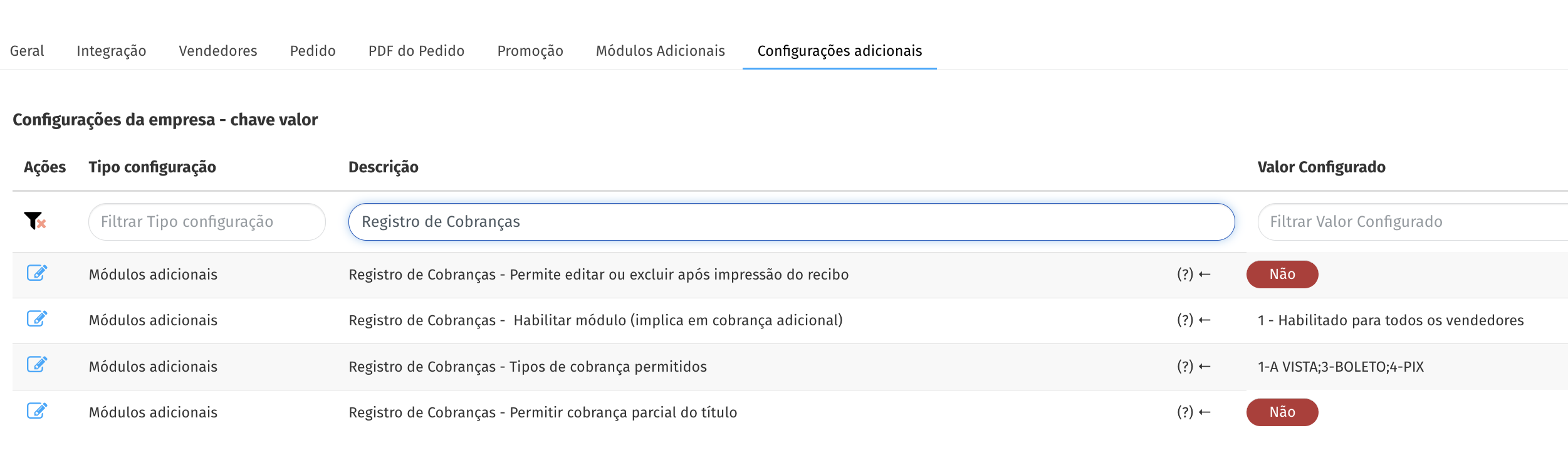
Enable module
Section titled “Enable module”To enable the module, simply select the desired option in the configuration
- 0 - Disabled: the module remains inactive.
- 1 - Enabled for all sellers: the module is automatically activated for all sellers.
- 2 - Enabled by seller: the module is activated only for authorized sellers. To do this, you need to access the seller’s registration, go to the “Configuration” tab and select the option “Allow billing registration”.
Edit or delete receipt after receipt print
Section titled “Edit or delete receipt after receipt print”In Demander, you can delete billing records. However, there is a setting that defines when the financial receipt can be edited or deleted.
When this option is ativa, the system allows editing or deleting a financial receipt that has already been printed but not yet synchronized. If the receipt has already been printed and synced, this setting does not allow it to be deleted.
Charge types allowed for charge registration
Section titled “Charge types allowed for charge registration”In Additional company settings, there is a setting called: “Charge types allowed for billing registration”
This setting allows you to restrict which charge types can be used in the charge record.
- Enter the types of charges separated by semicolons (;).
- The values must correspond exactly to those defined in the “Type of charge” column of the Financial Title.
Example: Boleto;Card;PIX
If the field is left blank, all titles can be received, without type restrictions.
Payment Method Permission
In addition to the type of charge, it is also possible to control whether a Payment Method can be used in the charge record.
When registering the Payment Method, there is the field: “Allows billing registration”
- When checked, it allows you to use this payment method in the billing record for a financial security.
- When unchecked, the payment method cannot be used to record charges.
This configuration ensures greater control and adherence to the company’s financial rules.
Allow partial billing of the title
Section titled “Allow partial billing of the title”This configuration allows or not the seller to receive the outstanding financial securities in part
- If enabled, it will allow the seller to receive partial payment of the outstanding title, with the balance remaining for the next payment.
- If it is not enabled, you will only be able to receive the entire value of the title, without being able to edit its value.
How to perform the integration
Section titled “How to perform the integration”Integration is carried out through Table 119 - Financial Receipt.
It is possible to control the seller’s permission by Table 02 - Sellers in Field 37 - Allows Billing Registration.
See the article Integration of the Billing Registration module, where we explain every detail of this integration.
Frequently asked questions
Section titled “Frequently asked questions”What is the investment to use this module?
Section titled “What is the investment to use this module?”There is an additional charge for each user who uses this module.
Contact the commercial sector for more information.
**On which Demander platforms will the functionality be available?**Only on Android (to report receipts) and Demander Web (for consultation only).
In which version of Demander Android is this feature available?
It was released in version 3.70 which was released in Beta on 04/06/2021.
Is it possible to use this functionality without integration?
Section titled “Is it possible to use this functionality without integration?”No, as currently financial management (creation/write-off of securities) is 100% via integration.
What happens if I allow editing or deleting financial receipts after printing the receipt?
If the functionality is used in bad faith, fraud may occur. (EX: The Seller charges the customer, delivers the receipt, but does not deliver the Money to the company, which is not even known about)