

Usage Hours Policies
A usage hours policy defines which days and hours sellers can use Demander Android/iOS — and, in part, Demander Web. You choose which operations are blocked outside the window (sync, start an order, finalize on the Web, and so on) and apply the rule to the company or to a specific seller.
The feature is already available in Demander Android (from 4.25) and Demander iOS (from 1.50). It replaced the old “sync start/end block time” setting.

What it controls
Section titled “What it controls”Days and hours
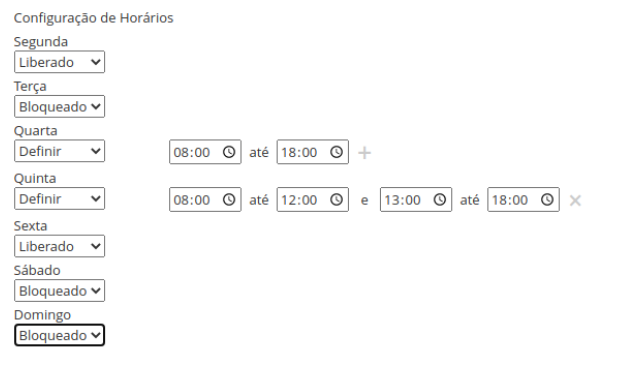
Section titled “Days and hours”For each weekday you pick one option:
| Option | Behavior |
|---|---|
| Released (Liberado) | Whole day allowed for the permitted operations |
| Blocked (Bloqueado) | Whole day blocked |
| Define (Definir) | Up to 2 intervals per day (horaInicio–horaFim). Allowed operations work only inside those windows |
Blockable operations
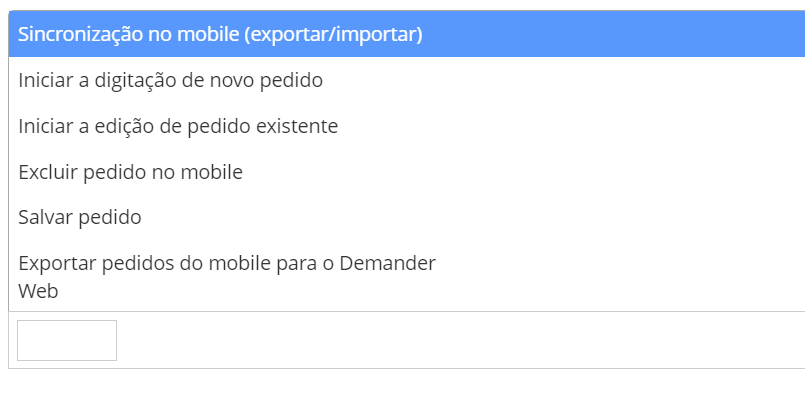
Section titled “Blockable operations”In the policy you select which operations the seller cannot run outside the allowed hours (or on a blocked day):
| UI label | API code (operacoesBloqueadas) |
Effect |
|---|---|---|
| Sync on mobile (export/import) | sincronizacaoMobile |
Blocks export/import. The seller can still work in the app; actions done outside the window only sync when the schedule allows |
| Start entering a new order | iniciarPedidoMobile |
Prevents starting a new order or duplicating orders in the App |
| Start editing an existing order | editarPedidoMobile |
Prevents viewing and editing existing orders in the App |
| Delete order on mobile | excluirPedidoMobile |
Prevents deleting orders in the App |
| Save order | salvarPedidoMobile |
Prevents saving orders in the App |
| Export orders from mobile to Demander Web | enviarPedidosParaWS |
Prevents sending orders from the App to Web/ERP (can still receive data and save) |
| Finalize orders in Demander Web | finalizarPedidosWeb |
Prevents finalizing orders in Demander Web outside the window |
Hierarchy
Section titled “Hierarchy”- The seller policy wins, if an active one is linked.
- If the seller has no policy (or it is inactive), the company policy applies.
- An inactive policy is ignored and should not be used for new links.
- If neither seller nor company has an active policy, there is no schedule restriction.
How to register
Section titled “How to register”- Open Usage hours policies.
- Click New (or edit an existing policy).

Fill in:
- Description — an easy name (e.g. “Mon–Fri 08:00–18:00” or “Policy — Seller Name”).
- Active — inactive policies are out of the hierarchy and should not be linked.
- Block message — text shown when an operation is blocked. Without a custom message, the app shows the default message with allowed hours.
- Schedule — Released / Blocked / Define per weekday (up to 2 intervals for Define).
- Operations blocked outside allowed hours — select the operations from the table above.
How to link
Section titled “How to link”At company level
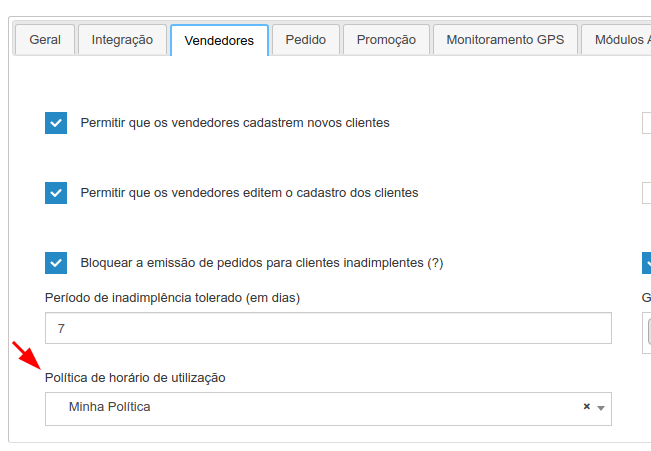
Section titled “At company level”- Open Company settings.
- Go to the Sellers tab.
- Under Synchronization time policy, choose the default policy for sellers without their own.
At seller level
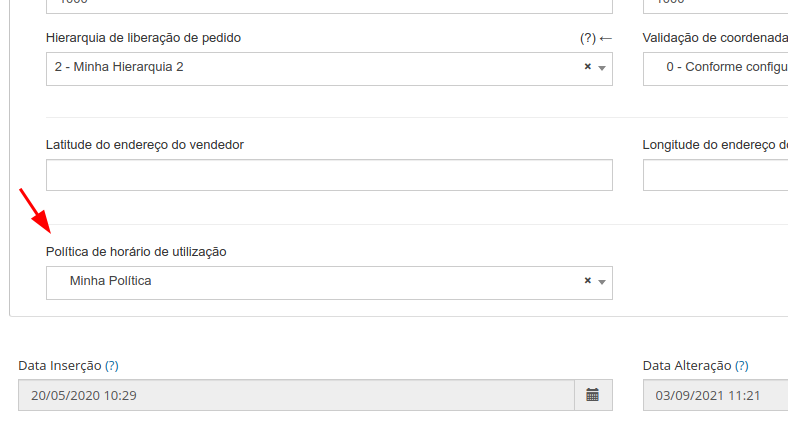
Section titled “At seller level”- Open Seller registration.
- Edit the seller → Configuration tab.
- Under Synchronization time policy, choose this seller’s policy.
What the seller sees
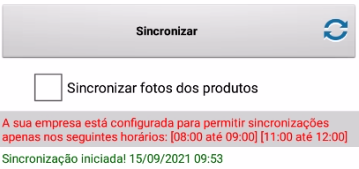
Section titled “What the seller sees”- No custom message: the app shows the default message with that day’s allowed hours.
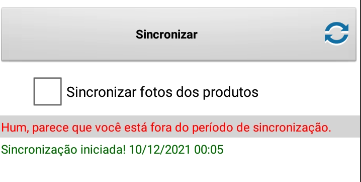
- Custom message: the app shows the text saved on the policy.
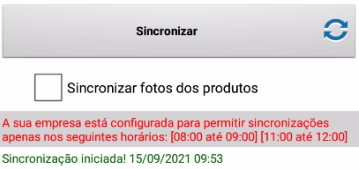
- Outside the hours (day released or with intervals): the app lists the allowed hours for that day.
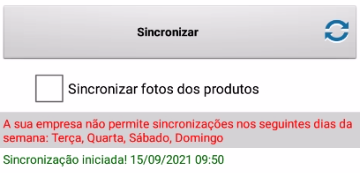
- Blocked day: the app lists which weekdays are allowed.
Migration / context
Section titled “Migration / context”Usage Hours Policies replaced the old “sync start/end block time” fields (removal announcement; KB 535517). In Additional company settings, the old mobile hour configuration already points to this article (Android 4.5 / iOS 1.29 onward).
For integrators
Section titled “For integrators”Use the REST API: Demander API — Usage Hours Policies.
UI ↔ API mapping:
| On screen | In the API |
|---|---|
| Liberado / Bloqueado / Definir | liberado / bloqueado / liberadoEntre |
horaInicio / horaFim |
inicio / fim |
operacoesBloqueadas codes match the table in What it controls.
Summary
Section titled “Summary”| When to use | What the policy does not do |
|---|---|
| Restrict sync and/or app operations by day/hour | Does not replace profile permissions, login, or user inactivation |
| Block order finalization on the Web outside the window | Does not auto-block every action — only the selected operations |
| Company-wide rule with seller exceptions | Ignores inactive policies; with no active link, there is no restriction |