Concept of quantity per package (Breakage of packaging)
The Package Breakage setting is used to determine whether it is possible to place an order in quantities that are not defined on the unopened package.
*IMPORTANT:
- *As of 12/04/2020, we have inactivated the configuration previously available in Company Settings -> Order Tab -> “Package Breakage Behavior”. This configuration is now found in *Order Types ->Configuration Tab -> “Package Breakage Behavior”, this way the configuration is now per Order Type and no longer general for the company.
Use case:
- Product A is sold in packs of 12 units, one customer wants to buy just 5 units, another customer wants to buy 16 units. You can change the behavior to prevent or allow the sale.
Required Settings
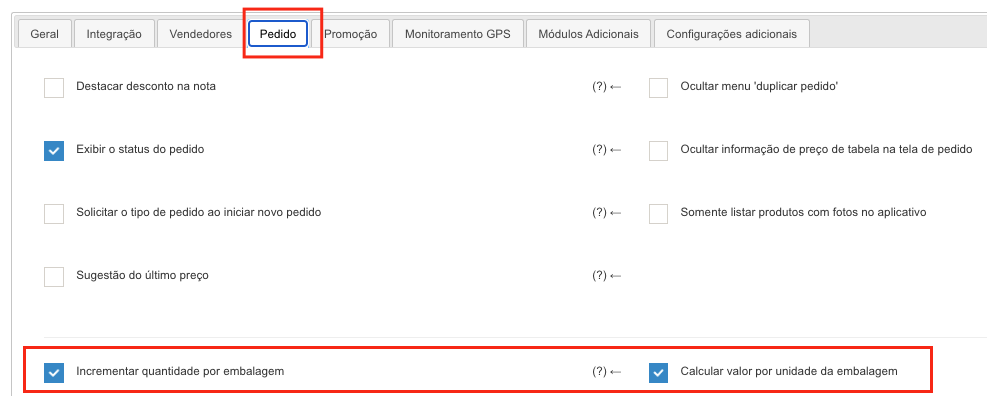
In Company Settings, Orders tab: *Configuration done directly by Demander.
-** Increase quantity per package**: By checking this option, when the seller increases the quantity of an item in the order, the quantity per package will always be added and not 1 by 1. Example: Product A has configured the quantity per package of 12, with this option checked, when clicking on “Plus” to add the quantity, 12 will be shown, if you click on add again it will be shown, if you click on “MINUS” it will return to 12. -** Calculate value per packaging unit**: By checking this option, on the Add items to order screen, the value of the unit in the packaging is shown. Example: Product A has a quantity of 12 per package and is sold for R$24.00, the unit value of R$2.00 will be shown.
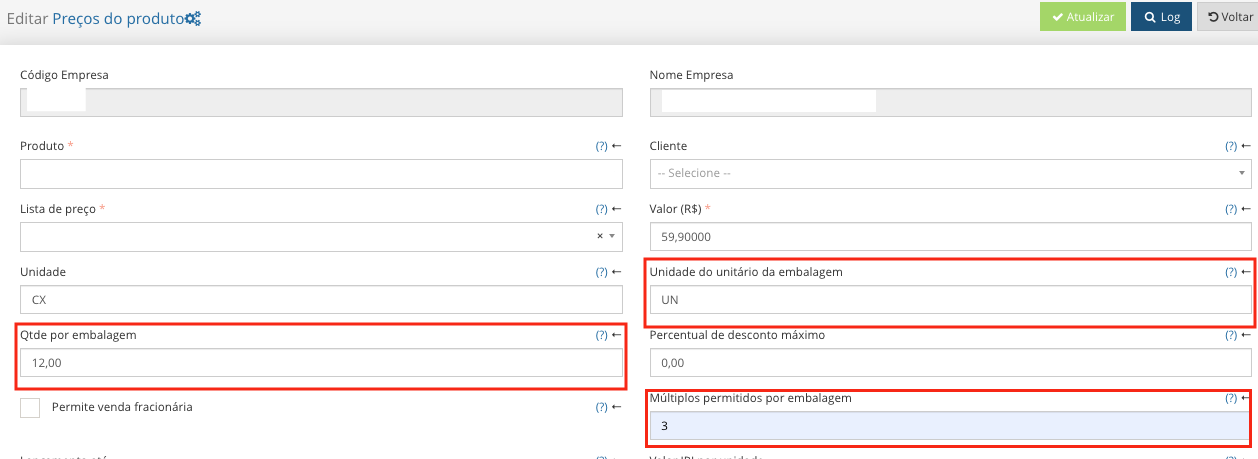
In Product Prices *This information needs to come via integration when the Demander system is integrated with an ERP.
- Packaging unit: Allows you to define the unit of the products that are inside the packaging. Example: Product A has a CX unit (box), in this field it is possible to define which unit of the product is inside this box.** (Field 4 of table 13 - Product Price)**
- Quantity per package: Defines the quantity per package of this product.** (Field 5 of table 13 - Product Price)**
- Multiples allowed per package: The value configured in these fields will be used when the seller adds more quantities of the item to the order. Example: Product A has a quantity per package of 12 units, if this multiples field has the value 3, it will be possible to sell products with 12, 15, 18… and so on. Leaving this field blank will respect the quantity per package, which in this case would be 12, 24, 36….(Field 13 of table 13 - Product Price)
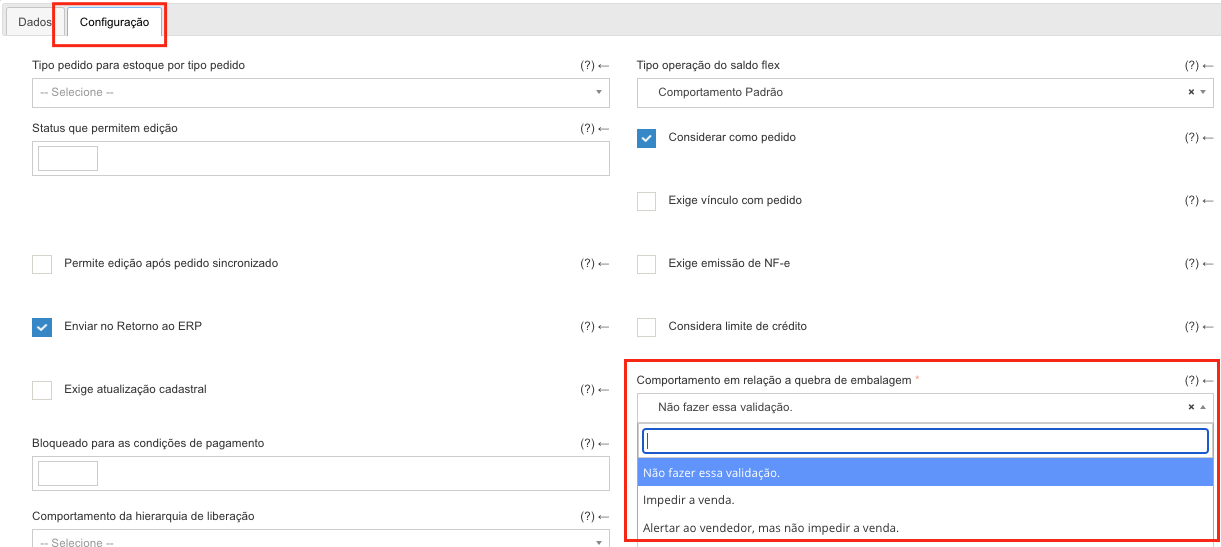
In the Order Types Configuration tab *Configuration done directly by Demander.
- Behavior regarding packaging breakage:
- Do not carry out this validation: The seller can choose the quantities and sell according to the customer’s needs, even if the product is sold in closed packaging, the seller can break the packaging and sell in any quantity.
- Prevent sale: The seller will only be able to place orders with the configured quantities, if the seller chooses a different quantity, a message will appear that the packaging has broken and that the product can only be sold in that quantity or in multiples of that quantity and the order cannot be saved.
- Alert the seller, but do not prevent the sale: When including products with quantities different from the quantity per package, a message will be shown warning that the package has broken, and the order can be saved normally.