

Recovery of unsynchronized orders on Mobile
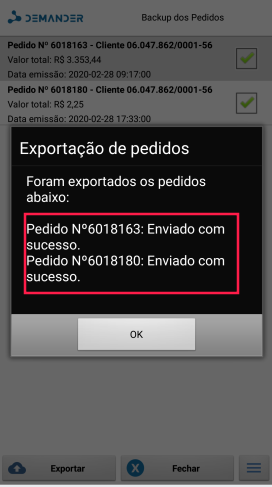
Use order recovery when there are orders finalized on the device that have not yet synchronized with Demander Web (app error, need to clear the local database, or send failure). The salesperson generates the backup without support connecting to the device.
When to use Order Backup vs synchronize
Section titled “When to use Order Backup vs synchronize”| Situation | What to do |
|---|---|
| Orders show as waiting for synchronization and the network is fine | Try to synchronize normally |
| The app shows an error, synchronization keeps failing, or you need to clear the database | Use Order Backup to export what is still only on the device |
| The order was already sent to Demander Web | Not a backup case; the order is already on the Web |
How to run the backup
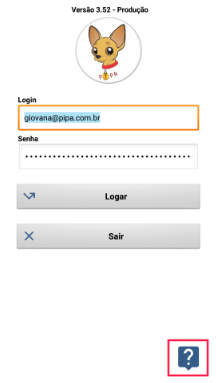
Section titled “How to run the backup”- In the app, open the Support menu (support / help icon).
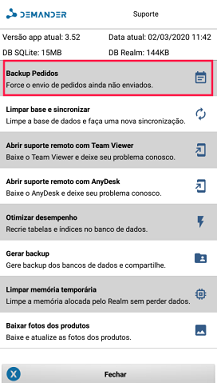
- Tap Order Backup.
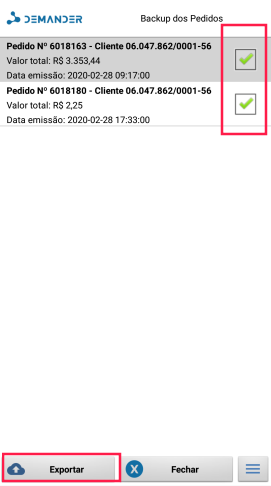
- Select the orders you want to export.
- Confirm the export.
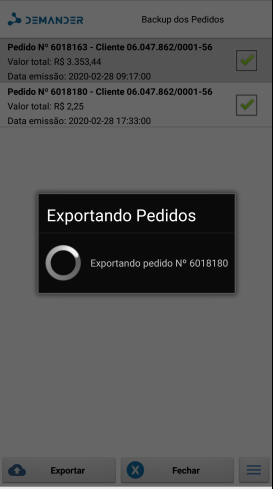
- Wait for the success message.
What the red icon / circle means
Section titled “What the red icon / circle means”In the mobile order listing, the red indicator (icon or circle) shows that the order is still only on the device — finalized and pending synchronization with Demander Web.
While that indicator appears, the order has not reached the Web. In that case:
- Try to synchronize.
- If synchronization keeps failing, use Order Backup.