Resolution of Pricing Policies
Available at:


The purpose of this article is to explain the logic that Demander uses to analyze and apply pricing policies. In order for you to understand how Demander’s logic works, you need to read this article from top to bottom.
Summary of topics in this article:
- Types of policy application
- Period of validity of policies
- Policy Type: Discount or Addition
- Apply automatic apportionment of the discount entered on the item in the applicable pricing policies
- Policy resolution modes
- [Frequently asked questions](#frequently asked questions)
Types of policy application:
The type of application is informed in Table 75 - Level 1 Pricing Policy of the Integration layout.
Pricing policies can be applied in two places:
* 1) Policies applied to the item: They are applied to specific items of the order. *EX: 5% discount on the “Drinks” Product Group. *In the example above, only order items that are from the “Drinks” Group will have a 5% discount
* 2) Policies applied to the Order: Are automatically applied to all order items. EX: *10% discount for “Cash Payment” method. *In the example above, all items in the order will have a 10% discount.
Note: See some important considerations to understand restrictions
Independence between order and item policies The algorithm that identifies the policies that will be applied,** completely separates order policies from item policies.
This means that: When “analyzing order item policies” it doesn’t matter the ranking and sequence of the “*policies that were applied to the order” *and vice versa, they are independent routines.
NOTE: Although they are independent, the algorithm used is the same, only the filter changes (Applies to: Order or Item).
Period of validity of policies When analyzing policies, Demander only considers Policies that are in force.
Demander does not consider policies that are outside their validity period.
Examples: Consider a policy with effect from 01/01/22 to 12/31/22 * If today is 12/31/21, then this policy is NOT yet in effect and will NOT be evaluated.*
- * If today is 2/21/22, then this policy is WITHIN the effective period and will be evaluated.*
- * If today is 01/01/23, then this policy is NOT in effect and will NOT be evaluated.
- NOTE: Both Level 1 Policies (fields 6 and 7) and Level 2 Policies (fields 5 and 6) have effective dates, both must be in force to be evaluated by the Demander.
Policy type - Discount or Add-on
Section titled “Policy type - Discount or Add-on”The Policy Type field, in Level 1 Price Policy, defines whether the applied rule will be a Discount (D) or a Addition (A) in the price.
With this option, policy analysis by Demander is performed in two steps:
- Resolution analysis is done for all Discount (D) policies, following the Resolution Mode configured in the company.
- Then, the same analysis is repeated for Additional (A) policies.
This approach allows discount and markup policies to be evaluated separately, but both based on the same priority and sequence rules.
Apply automatic apportionment of the discount entered on the item in the applicable pricing policies
Section titled “Apply automatic apportionment of the discount entered on the item in the applicable pricing policies”This functionality is enabled in Company Settings → Additional Settings Tab, through the setting “Apply automatic distribution of the discount entered on the item in the applicable price policies”.
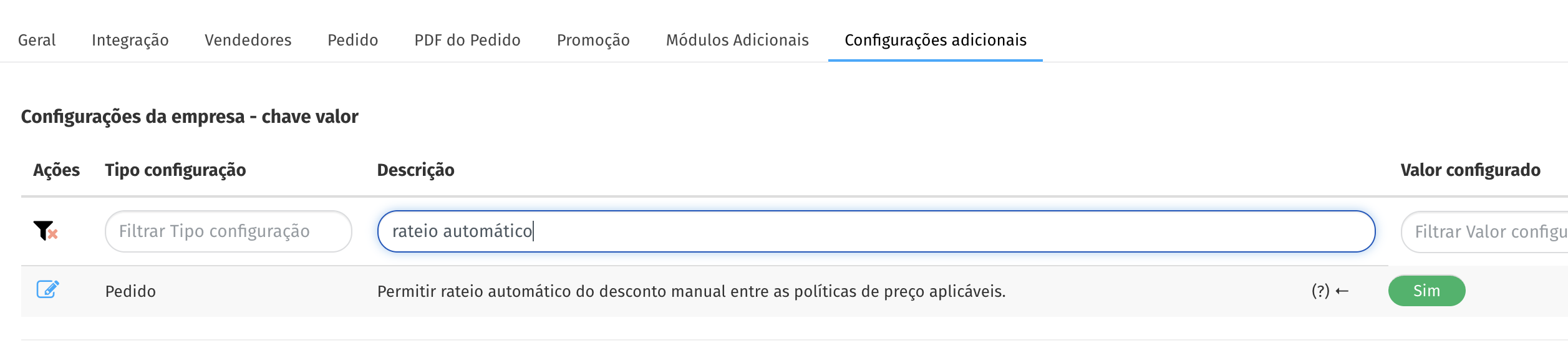
When disabled, the Unit Value and Discount fields are disabled on the item and on the order, making it necessary to enter the discount value or percentage directly in the policy.
When enabled, the item’s Unit Value and Discount fields are editable, allowing the user to manually enter a discount or increase on items.
When entering a value, the system performs automatic apportionment between the price policies that apply to the item. The apportionment process follows the order of configured policies:
- the value entered is distributed sequentially, starting with the first policy applied and continuing until the last;
- the apportionment ends as soon as the total amount of the discount or increase is completely distributed;
- therefore, not all policies will necessarily receive part of the apportionment.
⚠️Important: Only the price policies applicable to the item are considered at the time of calculation. Pricing policies from pedido are not yet covered by this functionality.
Policy resolution methods Demander starts the analysis of pricing policies by Ranking in ascending order starting from the lowest ranking to the highest ranking. When finding a ranking applicable to the Item/Order, it is analyzed by Sequence, in the same way as the ranking, in ascending order. From here, we have two settings for policy resolution, which will be detailed below.
See here how to configure policy resolution mode.
A sequence of multiple rankings
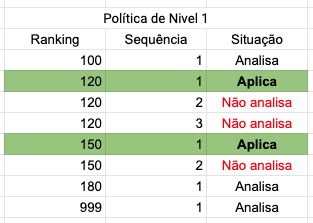
Section titled “A sequence of multiple rankings”In this configuration, all registered rankings are analyzed. However, in each ranking only one sequence can be applied.
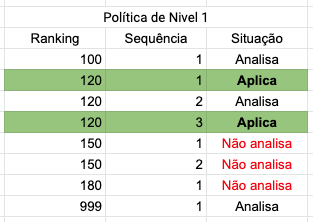
The rankings begin to be analyzed from top to bottom, when finding an applicable ranking, the analysis begins by sequence, finding one that applies, the other sequences are not analyzed, returning to search for applicable rankings, and repeating this cycle for each applicable ranking.
Therefore, we have the table below, where we can see the behavior of the application of policies.
- Multiple sequences of the same ranking
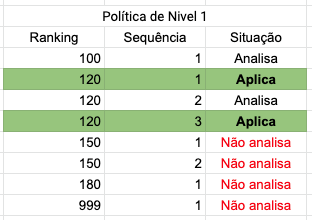
In this configuration, the applicable rankings are analyzed until one is applied. When a ranking is applied, no other rankings are analyzed.
The rankings begin to be analyzed from top to bottom, when an applicable ranking is found, all sequences within this ranking are analyzed, allowing more than one policy from this ranking to be applied. No other rankings are analyzed after finding one that applies.
Therefore, we have the table below, where we can see the behavior of the application of policies.
Rankings that are always analyzed in the Price Policy (Excesses)
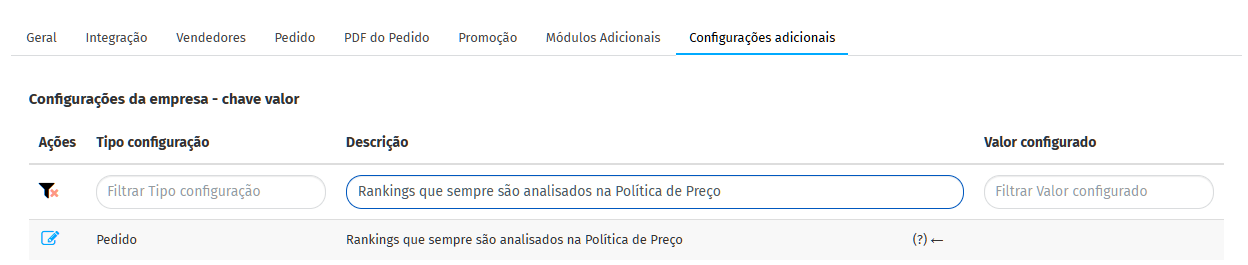
Section titled “Rankings that are always analyzed in the Price Policy (Excesses)”First, see how to configure exceptions, rankings that will always be analyzed
This configuration is used when the Policy resolution mode is configured as Multiple sequences of the same ranking.
If there is a ranking in the configuration above, it will always be analyzed, regardless of whether it has already been included in a previous ranking. Ex: When configuring ranking 999 as an exception it will be analyzed, even if ranking policy 120 was applied.
Therefore, we have the table below, where we can see the behavior of the application of policies.
Frequently asked questions
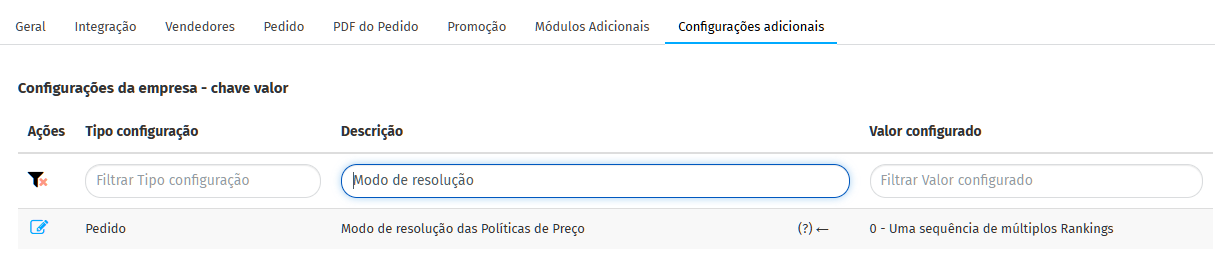
Section titled “Frequently asked questions”How to configure the “Price Policies resolution mode”?
- In Company Settings, access the “Additional Settings” Tab and look for the description “Price Policy Resolution Mode”.
How to configure the “Rankings that will always be analyzed in the Price Policy”
- In Company Settings, access the “Additional Settings” Tab and look for the description “Rankings that will always be analyzed in the Price Policy”.
- To add more than one ranking as an exception, simply separate them with a comma “,” without spaces between the records as in the example below.