

How to manually clean a company database / tables
Available on:

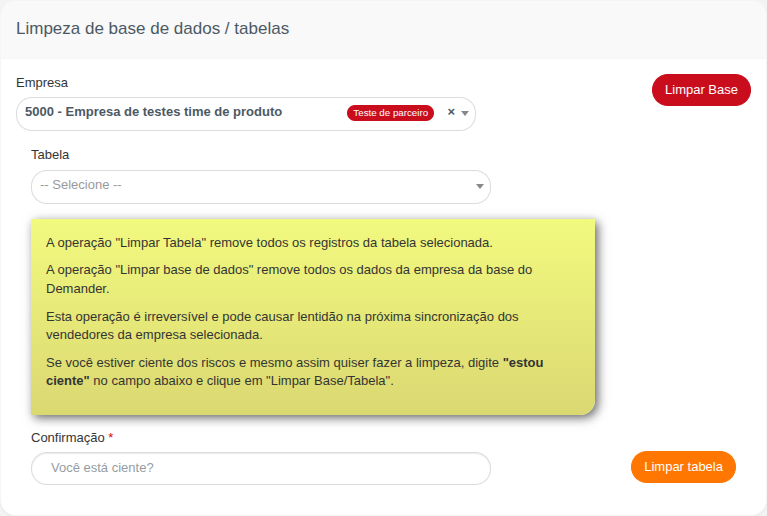
In Demander Web, the Limpar base de dados / tabelas screen removes a company’s records manually.
There are two different actions:
- Limpar tabela — deletes only the records of the selected table for the selected company.
- Limpar base — deletes the company’s data across several tables at once.
Who can use it
Section titled “Who can use it”The screen is under Utilitários → Limpar base de dados / tabelas.
- Admin and partner users see the Empresa selector and the Limpar Base button.
- A company user can clean only their own company (no other company to choose).
- The Limpar tabela button is available to anyone with access to the screen.
Before you clean
Section titled “Before you clean”Check these points:
- The correct company is selected (when the selector appears).
- You really need to delete the data — there is no undo.
- If the company uses an ERP integration, talk to support first: cleanup removes data in Demander and reintegration can take time.
- Type exactly
estou cientein the Confirmação field (same spelling, no quotes).
Clean one table
Section titled “Clean one table”Use this when you need to clear only one type of registration (for example products, customers, or prices), without cleaning the rest of the company.
- Open Limpar base de dados / tabelas.
- If the screen asks for Empresa, select the company.
- In Tabela, choose the table to clean (the list shows only tables allowed for cleanup).
- In Confirmação, type
estou ciente. - Click Limpar tabela.
Restrictions when cleaning a table
Section titled “Restrictions when cleaning a table”- Pedido — cannot be cleaned if the company status is Em produção.
- Cliente — cannot be cleaned if the company status is Em produção. Contact support if you need that change.
Clean the entire database
Section titled “Clean the entire database”Use this during implementation or testing, when the company needs to restart its cadastral data in Demander.
- Open Limpar base de dados / tabelas.
- Select Empresa (Admin or partner user).
- In Confirmação, type
estou ciente. - Click Limpar Base.
The Limpar Base button only appears when the company status allows the operation (for example Em testes, Em implantação, or Teste parceiro). For a company Em produção, the button is hidden and full cleanup is blocked.
After cleanup
Section titled “After cleanup”- The screen shows a success message when the operation finishes.
- Run a new sync or reintegration for the data you need again.
- Expect a slower next salesperson sync; that is normal after a large cleanup.
Quick summary
Section titled “Quick summary”| Situation | What to do |
|---|---|
| Delete only one type of data | Select Tabela, type estou ciente, click Limpar tabela |
| Restart the company (test/implementation) | Type estou ciente and click Limpar Base |
| Company Em produção | Cannot clean Pedido, Cliente, or the full base |
| Confirmation rejected | Type exactly estou ciente in Confirmação |