

Multiple Order PDF Layouts
In this article, we explain Demander’s Multiple Order PDF Layouts module.
All customers have 1 standard PDF layout for order generation.
For companies that need to use different PDF formats, Demander offers the Multiple Order PDF Layouts module.
This module is an additional resource with a monthly fee and allows you to create additional PDF layouts, making it possible to use different models according to the company’s needs.
Benefits
Section titled “Benefits”- Allows you to use different PDF templates.
- Makes it easier to adapt the PDF to different business situations.
- Improves the organization of information displayed in the document.
How does it work?
Section titled “How does it work?”With this module active, your company can have several order PDF layouts.
Each layout defines:
- what information appears in the PDF
- how information is organized
- which columns are displayed
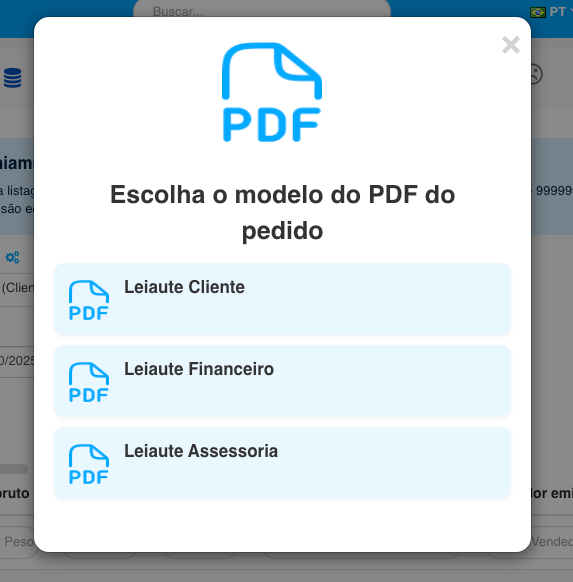
When generating the PDF of an order, the system allows you to select which layout you want to use, when more than one layout is available.
Usage examples
Section titled “Usage examples”Companies often use multiple layouts for different situations:
| Situation | Layout used |
|---|---|
| Order sent to customer | Layout commercial |
| Proposal submission | Proposal layout |
| Order internal | Internal layout |
| Order with additional information | Detailed layout |
Relationship with PDF customization
Section titled “Relationship with PDF customization”The layouts define the structure of the PDF, that is:
- what information appears
- how data is organized
If your company also wants to change the visual identity of the PDF, such as colors, fonts and images, see the module:
Order PDF Customization Module
Frequently asked questions
Section titled “Frequently asked questions”How many PDF layouts can I have?
Section titled “How many PDF layouts can I have?”The number of layouts is ilimitada.
After hiring the Multiple order PDF layouts module, your company can create as many additional layouts as necessary.
Depending on the complexity of the requested layout, there may be a charge for technical hours for creating or changing the layout. These cases are evaluated individually.
Who chooses which layout will be used when generating the PDF?
Section titled “Who chooses which layout will be used when generating the PDF?”The choice of layout is made by the user when generating the PDF.
When the company has more than one layout available, the system presents a list of layouts for selection.
Each user will only see the layouts that are available for their user group.
Can I set a default layout for the order PDF?
Section titled “Can I set a default layout for the order PDF?”Yes.
Each company has a standard PDF layout configured in the system.
If there are multiple layouts available, the user can also choose another layout when generating the PDF.
Can I use different layouts for different situations?
Section titled “Can I use different layouts for different situations?”Yes. It is possible to create different layouts for different purposes, such as:
- layout for proposal
- layout for shipping to the customer
- layout for internal use
Currently, the choice of layout is made manually by the user when generating the PDF.
In other words, the system does not yet automatically select the layout based on criteria such as order type, branch or customer.
Can I change the PDF layout without purchasing the multiple layout module?
Section titled “Can I change the PDF layout without purchasing the multiple layout module?”Yes. Demander has some default PDF layouts that can be selected in company configuration.
If your company wishes to maintain just one layout, but adapt it to the brand’s visual identity, you can use the module Personalization of order PDF.
Can additional layouts have different visual customizations?
Section titled “Can additional layouts have different visual customizations?”It depends on the modules contracted.
The Multiple Order PDF Layouts module allows you to create different layouts, mainly changing what information appears in the PDF and how it is organized.
Visual customization (colors, images, visual identity, covers, etc.) is part of the Order PDF Customization module.
Therefore, there are three possible scenarios:
- Multiple layouts only: allows you to create different PDF structures.- PDF customization only: allows you to visually customize a single layout.
- Multiple layouts + customization: allows you to have multiple layouts and visually customize each of them.
Can all users use any PDF layout?
Section titled “Can all users use any PDF layout?”Not necessarily.
Each layout can be configured to only be available to certain user groups.
This way, each user will only see the layouts released for their access group.
What happens if a layout is deleted?
Section titled “What happens if a layout is deleted?”If a layout is deleted, it can no longer be used to generate new PDFs.
Orders continue to exist normally, but it will no longer be possible to generate the PDF using the layout that was removed.