

How to register Price Lists
Available at:

This article aims to explain how price lists are registered within the Demander system.
What are price lists?
Section titled “What are price lists?”A price list is a record that defines the sales values of products according to the company’s commercial rules.
They allow you to have different values for different audiences or conditions, such as wholesale and retail.
Each list can contain:
- Products and their respective prices;
- Discount and surcharge rules;
Price List on Demander
Section titled “Price List on Demander”In the Demander system, the term Price List refers to the registration of a price table.
This registration, in itself, does not have direct functionality — it needs to be linked to products already existing in the system.
To use a price list, you need to:
- Have previously registered products;
- Register the prices of these products within the desired list.
👉 The price list works as a price grouper, allowing you to configure different commercial policies according to the needs of each customer, branch or operation.
How to register a price list
Section titled “How to register a price list”Access the Price Lists screen in the system and click New.
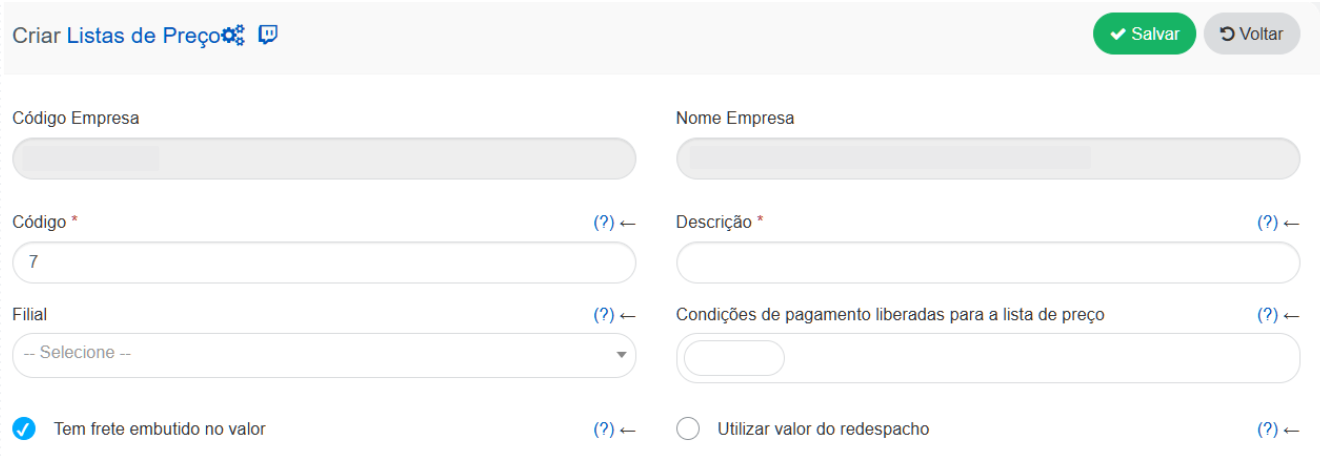
Required fields
Code*: Unique identifier of the Price List.
Description: Name that will be displayed in the order register.
Optional fields
Branch: Restricts the use of the list to a specific branch. Leave blank for use in all.
Payment terms released for the price list: Defines which conditions can be used on orders with this list. Unlinked conditions will not be available.
Has shipping included in the price: Indicates whether the prices include shipping costs.
Use redispatch value: Defines whether the Redispatch field will be displayed on the order screen.
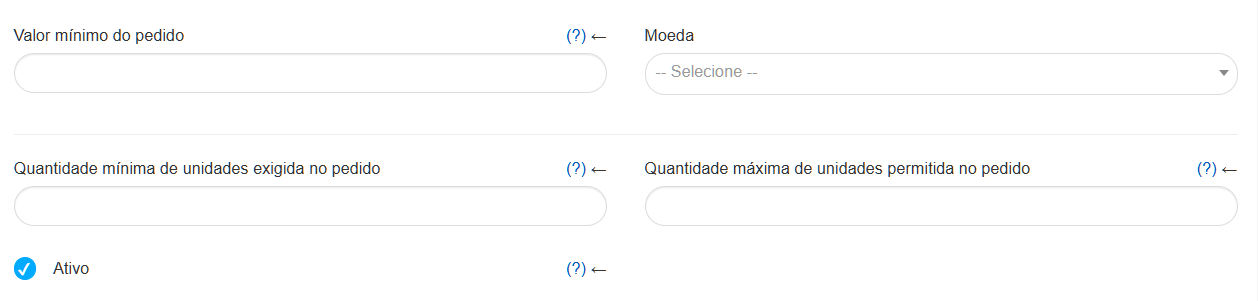
Minimum order value: Defines a mandatory minimum value for orders using this list. If it is greater than zero, it will be validated at the time of ordering.
Currency: Defines which currency will be used in the prices in this list.
Minimum quantity of units: Establishes the minimum number of units that the order must contain to use the list.
Maximum quantity of units: Defines the maximum number of units allowed in the order with this list.
Active: Defines whether the list is available for use. Inactive lists cannot be used in orders.
After filling out, the list will be available on the product price screen for registering values.
Import via Excel
Section titled “Import via Excel”If the import is done via an Excel spreadsheet, the price list is created automatically during the process — there is no need to create it manually beforehand.
For more details, see the article: ➡️ How to register products and price lists via Excel