

Customer Stock
Available at:

This article explains what the Customer Stock module is, why it is also called stock counting, and how to activate and use it in the app.
What is Customer Stock?
Section titled “What is Customer Stock?”The Customer Stock module stores the stock balance the customer holds on a given date — not your company’s inventory.
In the field, this feature is often called stock counting: during a visit, the salesperson counts (or updates) the products the customer sells or keeps on hand. With up-to-date information, they arrive at the negotiation prepared and can more accurately suggest what is missing — which supports replenishment sales.
The balance history also helps monitor the customer, forecast future sales, and plan the next visits.
The salesperson enters this information manually in the mobile app.
How to activate the module
Section titled “How to activate the module”On Demander Web, go to: Company Settings > Additional settings and enable the Customer Stock option.
When you turn on the button’s visibility, the module becomes available for use.

Using the button on the app’s home screen
Section titled “Using the button on the app’s home screen”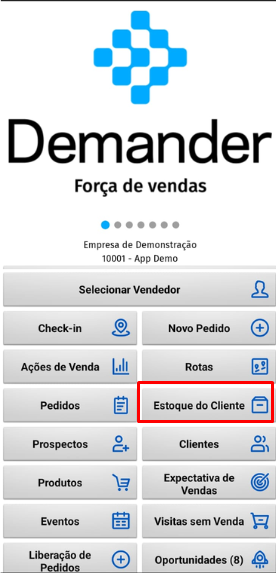
With the module active, the Customer Stock button appears on the app home screen. From there, the salesperson can:
- Register customer stock as an independent activity (the visit count);
- Add or subtract balances;
- Only view the customer’s current stock.
Using the screen to add items to an order
Section titled “Using the screen to add items to an order”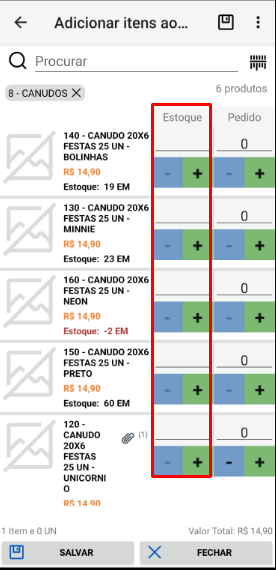
Another way to use it is when creating an order. On the add-items screen, there is a Stock column with the customer’s stock balance. The salesperson can update stock while building the order — adding or subtracting quantities — and negotiate replenishment based on what was just counted.