

Stock Concept
There are several ways to use, calculate Stock in Demander, in additional company settings it is possible to make several settings that change the way stock is calculated and validated.
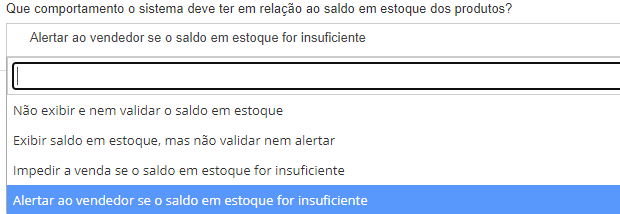
For stock to be validated on Demander Web and the app, follow the path below and select the option that best meets the Company’s needs.
Company Settings Order
Order
Video about stock by companies:
Frequently asked questions
Section titled “Frequently asked questions”How to register ready-delivery stock?
Section titled “How to register ready-delivery stock?”Note: Before making any changes, check whether the stock is fed through an integration. If it is, all updates must be made directly in the ERP/integrator, avoiding changes or manual registrations directly in Demander.
- Registering ready-delivery stock on Demander Web;
- Integration Layout: Table 57 - Ready-to-Deliver Stock.
How to register Stock by branch?
How to register Products?
Products can be registered manually on Demander Web, or sent via integration.
How to register Branches?
Branches can be registered manually in Demander Web, or imported via integration.