

What is the difference between saved, in progress, finalized, released, and sent order?
The main difference is that “Saved” indicates that the order data has been recorded, while the other terms indicate which stage of the process the order is in.
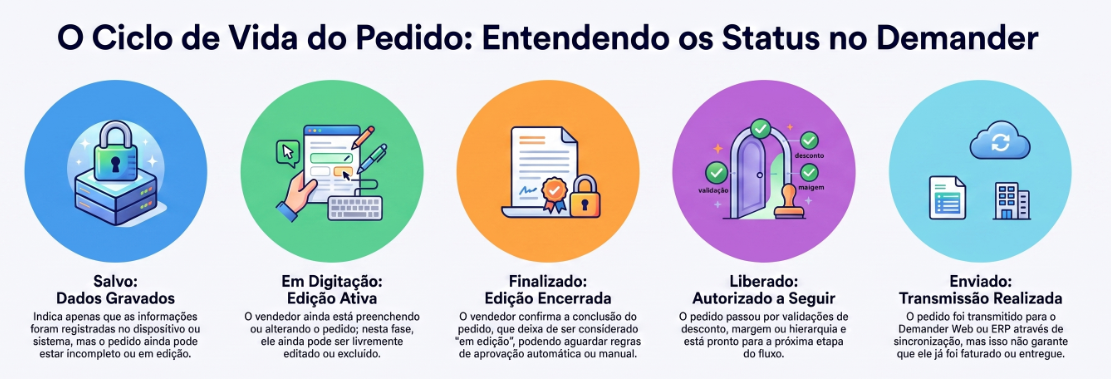
Saved order
Section titled “Saved order”Means that the data has been recorded on the device or system. This does not mean the order is ready, approved, or sent. It can still remain in the typing/editing process.
In progress
Section titled “In progress”Indicates that the order is still being filled out or edited by the salesperson. It may be saved, but it has not been completed yet. Normally, at this stage, the order can be modified or deleted.
Finalized
Section titled “Finalized”Means the salesperson ended editing and confirmed the order. From this point on, it is no longer treated as an order under editing.
In the app, this state usually appears as waiting for synchronization while the order has not yet been sent to Demander Web. It is the same finalized order, still pending transmission.
However, if there is an approval rule, the order may still be waiting for release.
Released (For users with order release hierarchy)
Section titled “Released (For users with order release hierarchy)”Means the order has been approved and is authorized to move to the next stage of the flow.
This release may be necessary, for example, when the order depends on approval due to discount, margin, order type, or an approval hierarchy.
Therefore, an order can be finalized, but still blocked waiting for release.
Means the order was transmitted during synchronization to Demander Web, ERP, or another configured integration.
It is important to highlight that “Sent” does not necessarily mean that the order has been invoiced, picked, or delivered. The term indicates only that the transmission of the order was completed.
Most common flow
Section titled “Most common flow”Saved order → In progress → Finalized → Released → Sent
This flow may vary depending on the rules configured for each company.
For example, an order can be finalized and remain blocked waiting for approval. Once released, it can be sent on the next synchronization.
Difference between “Released” and commercial status
Section titled “Difference between “Released” and commercial status”It is also important not to confuse “Released” with the commercial status of the order, such as Open, Invoiced, or Canceled.
The release indicates that the order is authorized to proceed within the Demander workflow. Commercial status, on the other hand, can be defined by the company and updated by the ERP as the order progresses.
Can I delete the order?
Section titled “Can I delete the order?”| Status | Delete in the app? | Delete / cancel elsewhere |
|---|---|---|
| In progress | Yes (if policy allows) | — |
| Finalized / waiting for synchronization | Yes (still only on the device; if policy allows) | — |
| Sent | Not on the device | Web/ERP or integration, per company rules |
Step-by-step by platform: How to delete an order on the device.
Summary
Section titled “Summary”- Saved: The data has been recorded.
- In progress: The order is still being filled out or edited.
- Finalized: The salesperson completed editing the order. In the app, it may appear as waiting for synchronization until it is sent.
- Released: The order was authorized to proceed in the flow.
- Sent: The order was transmitted to Demander Web, ERP, or configured integration.