

Avalara integration
When you issue the order, Demander asks Avalara for the taxes and fills in the IPI, ICMS and ICMS ST of each item.
Avalara is not a Demander product. The account and the credentials stay with Avalara.
The taxation module still applies to tax calculated by Demander. With Avalara configured, order taxes come from the online query.
What comes back on the item
Section titled “What comes back on the item”Each order item receives:
- unit price with taxes
- IPI amount and rate
- ICMS ST amount and rate
- ICMS amount and rate
The unit price with taxes is the item total, taxes included, divided by the quantity.
What to configure
Section titled “What to configure”- In Company Settings, Additional Modules tab, check Habilitar módulo de cálculo de impostos (IPI e ICMS ST).
- In Company Settings, Additional settings tab, Order group, check Habilitar calculo de Impostos Online. Partners and the Demander team see this option. The company user does not.
- Order issue must be online. The calculation calls the API at that moment. Without a connection, the order does not receive Avalara taxes.
- Create one Avalara configuration for the company, as in the next section. Only one configuration per company is allowed.
On the salesperson record, Configuration tab, Calcular impostos online sets the exception:
- Conforme configuração da empresa: follows item 2.
- Sim: calculates online even when the company has not checked Habilitar calculo de Impostos Online.
- Não: does not calculate online, even when the company has checked that option.
Where to configure
Section titled “Where to configure”In Demander Web, open Configurações Avalara.
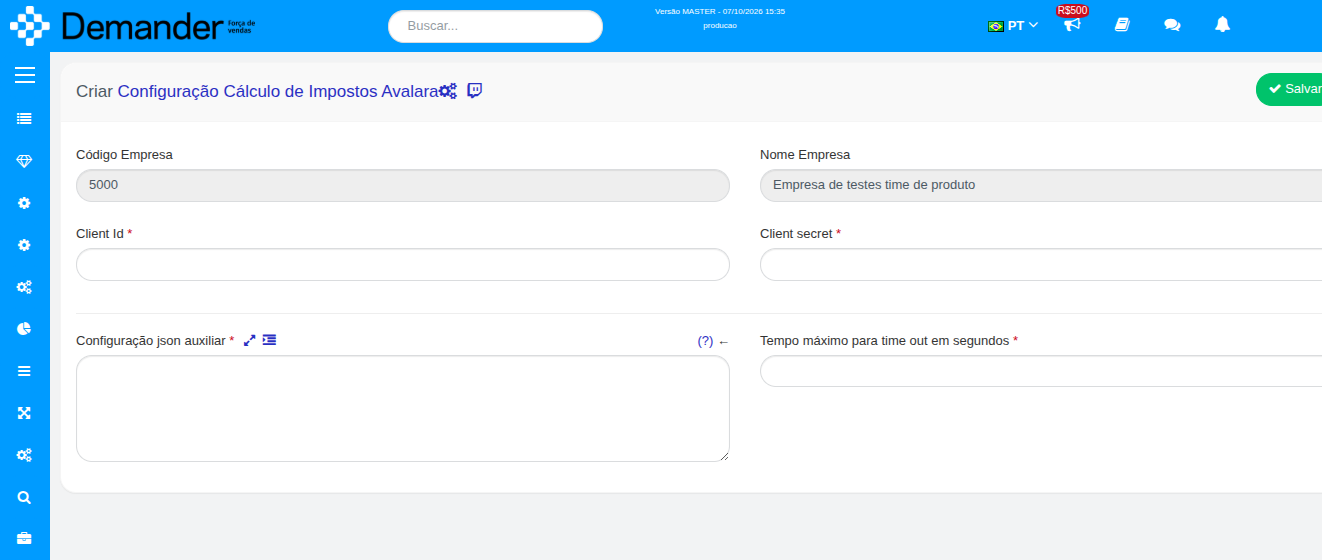
| Field on screen | What to fill in |
|---|---|
| Client Id | Avalara account identifier. |
| Client secret | Avalara account secret. |
| Configuração json auxiliar | Company JSON, described below. Required. |
| Tempo máximo para time out em segundos | Maximum query time. The default is 10. If Avalara does not answer in that time, the calculation fails. |
Company JSON
Section titled “Company JSON”Configuração json auxiliar stores ledger accounts, activity sector and the Avalara operation type for each order type.
{ "assetAccount": "", "expenseAccount": "", "incomeAccount": "", "activitySector": { "type": "", "code": "" }, "operationType": { "padrao": "", "dePara": [ { "codTipoPedido": 1, "valor": "" } ] }}The values come from the company setup in Avalara. Demander does not ship a ready-made list.
| Tag | Use |
|---|---|
assetAccount |
Asset account. Required. |
expenseAccount |
Expense account. Required. |
incomeAccount |
Income account. Required. |
activitySector.type and activitySector.code |
Establishment activity sector. Both are required. |
operationType.dePara |
Links the Demander order type code (codTipoPedido) to the Avalara operation type (valor). |
operationType.padrao |
Operation type used when the order’s order type is not in dePara. |
If the order type is not in dePara and padrao is empty, the calculation stops with the message that the operation type is not configured for that order type.
Product JSON
Section titled “Product JSON”Each product on the order needs this data on its record. It comes in through the integration, in the Table 15 – Products layout, field 42 (jsonCamposAuxiliares). The JSON must include useType and itemDescriptor. Without either one, Demander does not calculate the tax for that product.
{ "useType": "", "itemDescriptor": { "issBehavior": "", "hsCode": "", "ex": "", "cest": "", "source": "", "productType": "", "isIcmsStSubstitute": false }}| Tag | Use |
|---|---|
useType |
Item use type in Avalara. |
issBehavior |
ISS behavior. |
hsCode |
NCM. |
ex |
TIPI exception. |
cest |
CEST. |
source |
Goods origin. |
productType |
Product type in Avalara. |
isIcmsStSubstitute |
Whether the establishment is an ICMS ST substitute. |
The tag must exist. The accepted value is the one Avalara expects for that product.
On the order
Section titled “On the order”With this configuration, the order shows the Aplicar impostos button. While it queries, the screen shows Calculando impostos…
On save, Demander queries again. If the unit price with taxes of any item changes, the Pedido atualizado notice appears: taxes were applied and the order total changed, from one amount to the other. The order continues only after confirmation.
The order needs at least one item with quantity greater than zero. The order customer must exist in Demander, with name, address, CPF or CNPJ, state registration and city.
The CNPJ sent as the establishment is the order branch CNPJ. If the branch has no CNPJ, the company CNPJ is sent.
An individual goes as individual. A company goes as business. A customer with a tax customer type filled in goes as an ICMS taxpayer.
If the company also uses Sankhya or Focco
Section titled “If the company also uses Sankhya or Focco”Online calculation uses one integration at a time, in this order:
- Sankhya, when the company’s Sankhya integration is active.
- Avalara, when an Avalara configuration exists and Sankhya is not active.
- Focco, when the Focco integration is active and the previous two do not apply.
With Sankhya active, the Avalara configuration is not used on the order.
Common messages
Section titled “Common messages”| Message | What to review |
|---|---|
| Configuração auxiliar não configurada para a empresa. | Avalara configuration auxiliary JSON empty or invalid. |
assetAccount, expenseAccount, incomeAccount or activitySector não configurada para a empresa. |
Missing or empty tag in the company JSON. |
| Tipo de operação Avalara não configurado para o tipo de pedido. | Add the codTipoPedido to dePara or fill in padrao. |
| Cliente não localizado para cálculo de impostos. | Order customer not found for the company. |
| Produto não localizado para cálculo de impostos. | Item product code does not exist for the company. |
Produto com json auxiliar inválido, ou sem useType / itemDescriptor. |
Complete the auxiliary JSON of the product named in the message. |
| Um ou mais campos obrigatórios não foram informados. | Avalara rejected the request because a field is missing. |
| Não foi possível identificar o CFOP. | The combination sent did not produce a CFOP in Avalara. |
| Não foi possível obter o access_token. | Review Client Id and Client secret. |