

Information that Demander sends to Mercado Livre
This article presents the information that Demander sends to Mercado Livre.
Note: each product on Demander is an advertisement on Mercado Livre.
Announcement
Section titled “Announcement”When sending information, procedures such as ad creation*,ad description updateand *ad update (price, brand stock) will be carried out, except when one is selected as an option in Procedures that will be ignored.
The information used to create ads on Mercado Livre is:
Ad title
Section titled “Ad title”- The product name will be used for this field, maximum 60 characters.
Balance in stock
Section titled “Balance in stock”- The product’s stock balance will be used.
- It is important to highlight that, to create an ad ativo on Mercado Livre, it needs to have a stock greater than or equal to 1 unit.
The price of the product will be used according to the Price List selected in the integration configuration.
Category
Section titled “Category”- The Mercado Livre category to which the created ads will belong can be configured in different ways;
- Initially, the ad will be associated with the category configured in Categoria Mercado Livre X Product Group;
- If there is no category configured for each product group, Mercado Livre will try to automatically find one according to the title of the ad (product name).See about.
- Note: Demander product groups will only be used to associate Mercado Livre categories, if the user so wishes (Mercado Livre Category X Product Group). Mercado Livre has its own descriptions to categorize ads. The category of an ad will be defined according to Ads Settings.
Description
Section titled “Description”- The description of each advertisement will be filled with the content of the product’s “Virtual Store Observation” field;
- The field content will be sent as normal text, without HTML markup or images.
Demander will use the product image to create the ad.
If the product does not have one, a standard image will be used.
Only one image is sent, if necessary, more images can be inserted directly on the Mercado Livre platform.
Product brand in the ad
Section titled “Product brand in the ad”- The brand will be seen and sent as an attribute of the product.
If there is any change in the price or stock balance of a product, the advertisement linked to this product will also change.
Restrictions and considerations
Section titled “Restrictions and considerations”The ad title cannot be changed after the ad is created
Section titled “The ad title cannot be changed after the ad is created”After creating an ad, it will only be possible to change its title through the Mercado Livre platform.
Price of products with more than two decimal places will be rounded
Section titled “Price of products with more than two decimal places will be rounded”Mercado Livre does not accept advertising values with more than two decimal places. If your company uses these values, Demander will round the last digits so that the ad can be created. Ex: if there is a product with a unit value of R$ 13.456, this will be rounded up to R$ 13.46.
Minimum value of an ad
Section titled “Minimum value of an ad”There is a question of minimum value for ads on Mercado Livre, to find out more see the documentation link. Mercado Livre - How much does it cost to sell a product.
Have products with zero or negative stock balance
Section titled “Have products with zero or negative stock balance”Product with zero stock will be shipped normally, however Mercado Livre will inactivate your ad. Mercado Livre only allows ads with a balance equal to or greater than one, when it reaches zero the ad is inactivated until the quantity in stock is updated.
If the company has products with a negative stock balance, Demander will consider the balance to be zero. This is necessary, as Mercado Livre does not allow negative stock, so the ad will be created as inactive, but can be updated in the future.
Some categories do not allow products without imagesTo get around this Mercado Livre restriction, Demander will send a standard image for products that are missing.
Section titled “Some categories do not allow products without imagesTo get around this Mercado Livre restriction, Demander will send a standard image for products that are missing.”Different image of the product may cause ad inactivation on Mercado Livre
Section titled “Different image of the product may cause ad inactivation on Mercado Livre”If Mercado Livre considers that the image of your product does not correspond to the title of the advertisement, it will be canceled or inactivated on the platform.
The ad image is not updated
Section titled “The ad image is not updated”Once an ad is created, its image will not be updated if the image of the product linked to the ad is changed. If necessary, images can be manipulated directly in Mercado Livre.
It is not possible to change the category after creating an ad
Section titled “It is not possible to change the category after creating an ad”After creating an ad, the Mercado Livre platform does not allow editing/changing the ad category. If necessary, the ad must be edited and advertised again or even deleted on Mercado Livre.
Product in Fulfillment (Mercado Envios Full) does not allow changes to stock
In cases where the product is stored by Mercado Livre, for Full shipping, Mercado Livre does not allow changing the stock of this product.
Automatic categorization of ads
Section titled “Automatic categorization of ads”The automatic discovery of categories for ads, when configured, occurs on behalf of Mercado Livre. Some mistakes can occur in this way, as a product can be associated with a different category than the one it should really belong to. Another situation is the risk of your ad being inactivated or your Mercado Livre account being blocked for a certain period if the ad is associated with the categories of products prohibited on Mercado Livre.
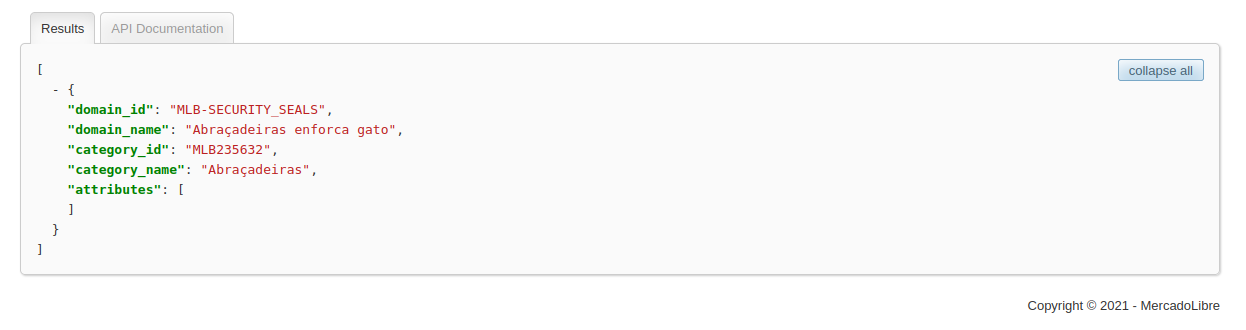
- You can use this link to test which category your product will be assigned to, copy and paste it into your browser and after the equal sign ( = ) at the end, enter the description of the desired product. https://api.mercadolibre.com/sites/MLB/domain_discovery/search?q=
- For example: pasting the link,** https://api.mercadolibre.com/sites/MLB/domain_discovery/search?q=abracadeira nylon c10 200 units**, we will have a return as shown in the image below with the description of the automatically discovered category for the desired product.
Reactivation of inactive ads on Mercado Livre due to zero stock
Section titled “Reactivation of inactive ads on Mercado Livre due to zero stock”If an ad is inactive due to low stock, it can be reactivated if the stock balance is updated on Demander and the updated information is sent to Mercado Livre.
Situations in which the ad should be deleted
Inactive ads due to: images that do not correspond to the product, lack of technical information, ad title different from the configured category, product category prohibited on Mercado Livre, among others, must be treated or deleted directly on Mercado Livre.
Mandatory attributes according to product category Some product categories require specific attributes to be filled in, as shown in the following example:
- The “Paints” Category requires information such as: Is it flammable?
- These “questions” are dynamic and Demander does not have the answers to them. In these cases, the alternative we have is the following:
- Register ads directly on Mercado Livre;
- Synchronize/import ads from Mercado Livre to Demander;
- Link the ad imported from Mercad Livre with a Demander product;
To find out how to configure integration with Mercado Livre, see the link below: