

Information that Demander sends to the Integrated Store
This article aims to document the information that Demander sends to Loja Integrada.
Before continuing reading, it is important that you know about the existence of the Tables that will not be exported configuration available on the Integrated Store Configuration screen.
Category Integration
The Integrated Store’s categories are the equivalent of Demander’s Product Groups, so when we are referring to Demander we will use the term Product Group and when we are referring to the Integrated Store we will use the term Category.
Integrated fields:
- Code
- Name
- Parent Group
The integration key is the code
If for any reason the registration of a Product Group is edited (which has already been sent to the Integrated Store) and the code field is changed, in the next synchronization the Integrated Store API will create a new Category and the old one will continue to appear in the Store.
The Active field of the Product Group registration is disregarded
Even if the Product Group is Inactive, if for any reason there is an active Product with this Group, it (Group) will be sent to the Integrated Store.
The “Hide in Online Store” field in the Product Group registration is disregarded
This field is only used in Demander’s own Virtual Store (pedido.la).
Integration only considers Product Groups that have active products
To make it easier to understand, we will use an example. Consider that your company:
- I have more than 20 Product Groups registered on Demander;
- It is configured to integrate using the Price List “10 - Integrated Store Products”;
- The “10 - Integrated Store Products” Price List has 15 active products distributed in 3 different Product Groups.
In the scenario above, Demander will send only the 3 Product Groups (and their respective Parent Groups) to the Integrated Store.
The integration does not support inactivating and deleting Categories
This is a limitation of the Category Integration API provided by Loja Integrada. In other words this means that:
- Any Category to no longer appear in the Integrated Store must be inactivated or deleted manually in the Integrated Store Panel.
- Even if the Product Group was inactivated in Demander, it will be necessary to inactivate the Category manually in the Integrated Store Panel.
The Integrated Store displays all active categories
Even if the Product Group no longer has any products (either in Demander or in the Integrated Store), it will be necessary to inactivate the Category manually in the Integrated Store Panel.
Brand Integration
Section titled “Brand Integration”Integrated fields:
- Name
Non-integrated fields:
The information below can be changed directly in the Integrated Store Panel (without the risk of being overwritten by the integration):
- slug
- Description
- Nickname
- Image
The integration key is the code
If for any reason a Brand registration is edited (which has already been sent to the Integrated Store) and the code field is changed, in the next synchronization the Integrated Store API will create a new Brand and the old one will continue to appear in the Store.
The integration disregards the Active field of the Brand registration
Even if the Brand is inactive on Demander, if for any reason there is an active Product with this Brand, it will be sent to the Integrated Store.
Brands
Section titled “Brands”Products
Section titled “Products”Demander sends to the Integrated Store only those Brands that have at least one active Product in the configured Price List.
Integration does not support inactivating and deleting tags
This is a limitation of the Brand Integration API provided by Loja Integrada. In other words this means that:
- Any Brand to no longer appear in the Integrated Store must be inactivated or deleted manually in the Integrated Store Panel.
- Even if the Brand has been deactivated on Demander, it will be necessary to deactivate it manually on the Integrated Store Panel.
Product Integration
Section titled “Product Integration”Fields we always send:
- SKU: Equivalent to Code
- Name
- Full description: Equivalent to Online Store Observation.
- Active
- Type: Fixed “Normal”
Fields that we only send if they are filled in:
The fields below are only sent to the Integrated Store if they are filled out.
Example: You do not have the measurements of the products (height, width and length) registered in Demander. In this case, it is possible to register them directly on the Integrated Store Panel with the security that the integration will not delete them.
- Weight: Equivalent to Gross Weight (in KG)
- Height (in cm)
- Width (in cm)
- Depth: Equivalent to Length; (in cm)
- Product Group: NOTE: Even if it is specified in the Product, when Store is configured not to export Categories then we stop sending this field.
- Brand: NOTE: Even if it is stated in the Product, when the Store is configured not to export Brands then we stop sending this field.
Non-integrated fields:
The fields below Demander does not send to the Integrated Store, which allows them to be changed directly in the Integrated Store Panel:
- Highlight: Places the product highlighted in the Store.
- Used: Determines whether the Product is Used or New.
- Removed: Deleted the product from the Store.
- Nickname
- Blocked
- NCM
- YouTube Video URL
The integration key is the code
If for any reason the registration of a Product is edited (which has already been sent to the Integrated Store) and the code field is changed, in the next synchronization the Integrated Store API will create a new Product and the old one will continue to appear in the Store.
The integration only considers Products from the configured Price List
Demander sends only products that have a price in the Configured Price List to the Integrated Store.
In the first synchronization we only send active Products from the configured Price List, in other synchronizations we also send inactive products, as long as they have already been sent previously (this allows them to be inactivated in the Store).
Price Integration
Section titled “Price Integration”Fields we always send:
- Full: Equivalent to the unit value.
Non-integrated fields:
Demander does not send the fields below to the Integrated Store, which allows them to be changed directly in the Integrated Store Panel:
- Cost: Equivalent to the Cost Value of the Product;
- Promotional: Equivalent to the Promotional Value of the Product;
Integration does not include the concept of Price per Customer
At Demander there is the Price per Customer concept, where certain customers can have a special price for certain products, unfortunately the Integrated Store does not have this concept.
Integration does not include the Promotional Price
At Demander there is the concept of a promotion period, where for example it is possible to configure that a certain product will be on sale next week.
The Integrated Store does not have the concept of the validity of the promotion, so due to the incompatibility we chose not to integrate the promotional price
NOTE: This means that the promotional price is never sent to the Integrated Store.
Stock Integration:
In the store integrated into the registration of each product, it is possible to configure the following fields (image below)
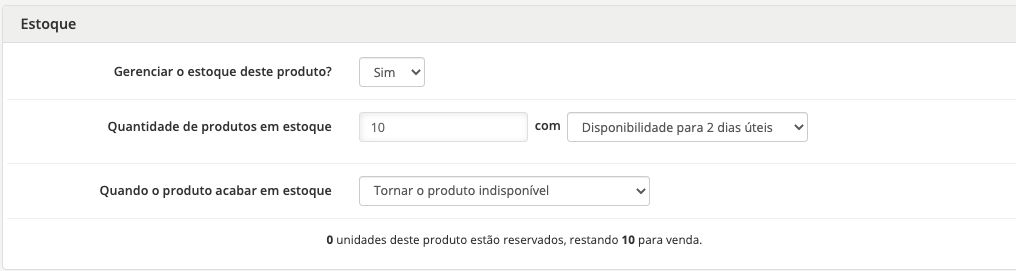
In Demander we do not have these fields in the Product registration, however they exist on the [Integrated Store Configuration] screen (/en/integracoes/loja-integrada/166811-configuracao-da-loja-integrada/);
Fields we always send:
- Managed: For all products we send the equivalent of field “Manage product stock” available on the [Integrated Store Configuration] screen (/en/integracoes/loja-integrada/166811-configuracao-da-loja-integrada/)
- Quantity: We send the value that is in the Balance in Stock field of the Product registration;
- Stock Status: For all products we send the equivalent to the field “Deadline for shipping (WITH stock available)” available on the Integrated Store Configuration; screen
- Out of stock situation: For all products we send the equivalent to the field “Deadline for shipping (NO stock available)” available on the Integrated Store Configuration. screen
Integration does not include the concept of Stock per BranchIn Demander there is the concept of Stock per Branch, however the integration with the Integrated Store does not include this concept.
Integration does not include the concept of Ready-to-Deliver Stock
In Demander there is the concept of Ready Delivery Stock, however the integration with the Integrated Store does not include this concept.
Product Photo
Demander sends the photo of each product to the Integrated Store, but due to limitations of the Integrated Store API, Demander can only add photos to products, we cannot change an existing photo or delete it.
Only one photo per product
Currently, Demander’s product registration only allows one photo per product, so our integration can send this single photo to the Integrated Store.
But it is worth highlighting that it is possible to add more photos to the product registration directly in the Integrated Store Panel.
Integration does not include updating or deleting product photos
Attention: This point is very important and deserves attention.
This means that after the product photo has been uploaded to the Integrated Store, even if the photo has been updated/replaced or removed from Demander it will not be updated or removed in the Integrated Store.
NOTE: It is worth highlighting that this is not a limitation of Demander, but of the Integrated Store Integration API.
For more information, read the article on the Loja Integrada support forum that deals with the impossibility of changing or deleting product photos via the Integration API.