Information that Demander seeks on Mercado Livre
This article presents the information that Demander seeks on Mercado Livre.
Customer Import
Section titled “Customer Import”Customer import happens with order import, that is, when the order is being imported, the associated customer will also be imported into Demander.
Fields that will be imported
Section titled “Fields that will be imported”The fields below will be imported into Demander:
- Name/Corporate Name/Trade Name
- CPF/CNPJ
- As it is not mandatory in Mercado Livre, customers may be imported without CPF/CNPJ if they have not informed them.
- Type of Person
- Physical or Legal, according to CPF/CNPJ, if informed. If not informed, it will be considered an individual.
- Email:
- In Demander it is saved as “Buyer’s email”.
- Delivery Address:
- If the customer made the purchase with a delivery address: Demander saves the delivery address entered in Mercado Livre directly in the Customer’s address fields (Address, Number, Neighborhood, Zip Code, Complement and City).
- If the customer made the purchase and used the option to collect in person: Demander saves using the same address as your company. Ex: your company has the address “Av. Dom Pedro, n° 586 - Centro”, it will be saved on these occasions.
- Seller:
- The customer will be linked and will only appear to the seller chosen in order integration configuration.
Demander uses the customer’s CPF/CNPJ as a key to import the customer
Section titled “Demander uses the customer’s CPF/CNPJ as a key to import the customer”The import routine checks whether the Demander already has a CPF/CNPJ equal to the one imported from Mercado Livre.
If Demander already has a customer with the same CPF/CNPJ, then:
- The existing customer is used in the order;
- The existing customer is not changed, i.e. no information is updated. (see explanation below).
If Demander doesn’t have a customer with the same CPF/CNPJ, then:
- Demander inserts a new customer.
The import does not update the customer’s registration
Section titled “The import does not update the customer’s registration”If the customer who placed the order on Mercado Livre is already registered with Demander, no registration update is carried out based on data from Mercado Livre.
Example: the customer with CPF 11.111.222-99 is already registered with Demander with the name “Fulano da Silva” with address “Rua ABC, 12 Lajeado-RS”, if in Mercado Livre he enters the address “Rua XYZ, 999 Porto Alegre-RS” the Demander will not update the address.
Despite not updating your registration, the customer information used in Mercado Livre is saved in the observation of each imported order.
Order Import
Section titled “Order Import”Only orders whose Status (on Mercado Livre) is configured to be imported by Demander are imported. See the setting Import orders with the following Statuses to Demander.
Fields that will be imported
Section titled “Fields that will be imported”- Number:
- The next number in the numbering range of the seller configured in the integration is generated.
- Seller:
- The salesperson configured in the integration is always used, regardless of the salesperson serving the Customer (if that customer is already registered).
- Client:
- See topic Customer Import
- Issue date
- It is filled with the “Date of the order placed on Mercado Livre” or the “Date of import of the order to Demander” depending on the order integration configuration.
- Value of Products:
- Equivalent to the sum of the total value of the products.
- Shipping Value:
- It is filled in with the Shipping value calculated by Mercado Livre.
- Total Order Value:
- This value is the total value of products + shipping;
- Does not include interest on installments or others that may exist.
- Ex: a purchase was made of R$1,000.00 paid in 10 installments with total interest of R$100.00 on the purchase and shipping cost R$25.00. Interest will be paid by Mercado Livre, only R$ 1,000.00 (as the Total Value of the Products) plus R$ 25.00 (which will be the Shipping Value) will be imported. The total Order Value will be the sum of the two, resulting in R$ 1,025.00.
- Type of Order:
- It is filled with the Order Type configured in the integration;
- Branch:- It is filled with the Branch/Unit configured in the integration;
- The branch linked to the Customer’s registration is disregarded.
- Payment Condition:
- It is filled with the Payment Condition configured in the integration.
- Payment Method:
- It is filled with the Payment Method configured in the integration.
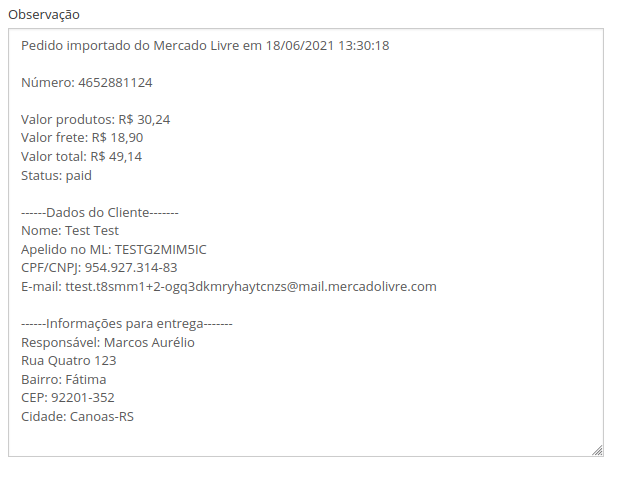
- Order Note:
- It is filled with customer and order information.
Image | Observation of a Demander Web order
- Order Items
- For each item the following fields will be imported:
- Product
- Unit Value
- Quantity
- Total Value
- Under no circumstances will any discount be applied directly to the product.
- For each item the following fields will be imported:
Ad Import
Section titled “Ad Import”In all synchronizations, Demander imports existing ads on Mercado Livre. Ads that are inactive on Mercado Livre will also be imported normally, but this will not inactivate the corresponding products on Demander.
Demander also imports the Status of Ads, they can have 4 statuses.
- Active: (When the ad is active on Mercado Livre and available to buyers)
- Inactive: (When the ad is no longer available to buyers)
- Paused: (When the ad was paused by Mercado Livre. To find out the reason, access the Mercado Livre administrative panel)
- Under review: (When Mercado Livre places the ad under review. To find out why, access the Mercado Livre administrative panel. There are products that can remain under review for up to 72 hours)
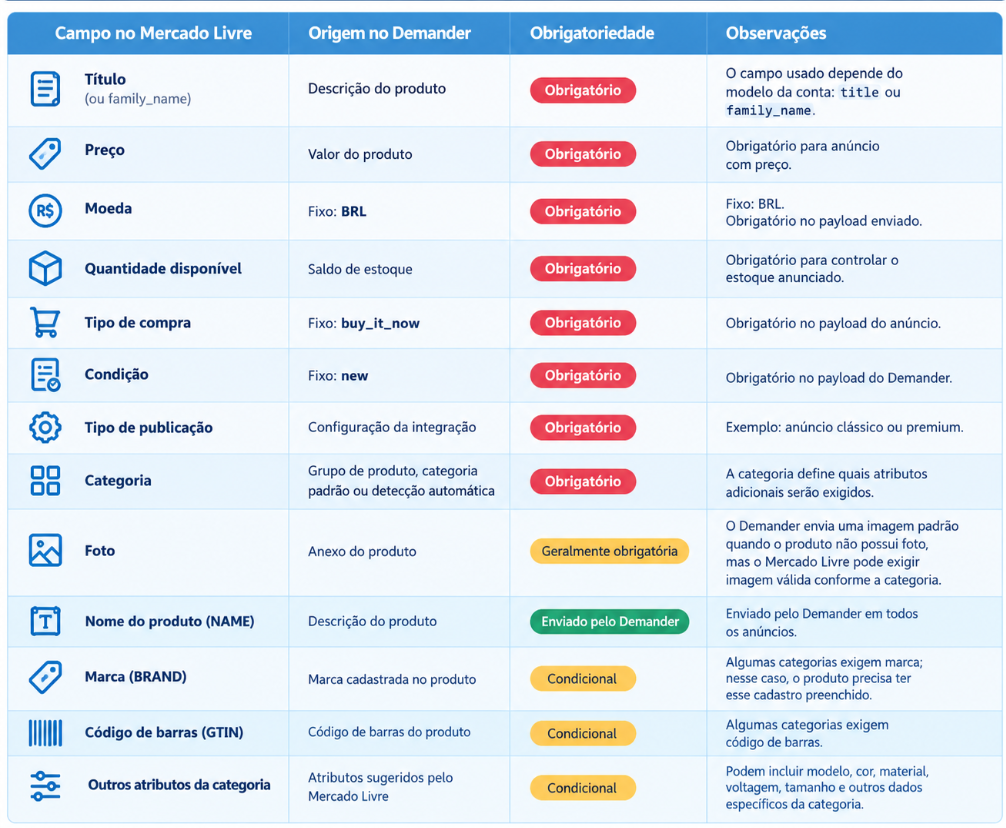
Automatic ad linking with Demander product:
Section titled “Automatic ad linking with Demander product:”When importing ads, Demander will automatically match the ad with the product that has the same description.
When it is not possible to create an automatic link, it will be necessary to make the manual link between the product and the ad.
Synchronization is blocked while there are ads without a linked product:
Section titled “Synchronization is blocked while there are ads without a linked product:”Sending data to Mercado Livre is blocked as long as there are active ads (on the Queries  Mercado Livre Ads screen) that are not linked to any product.
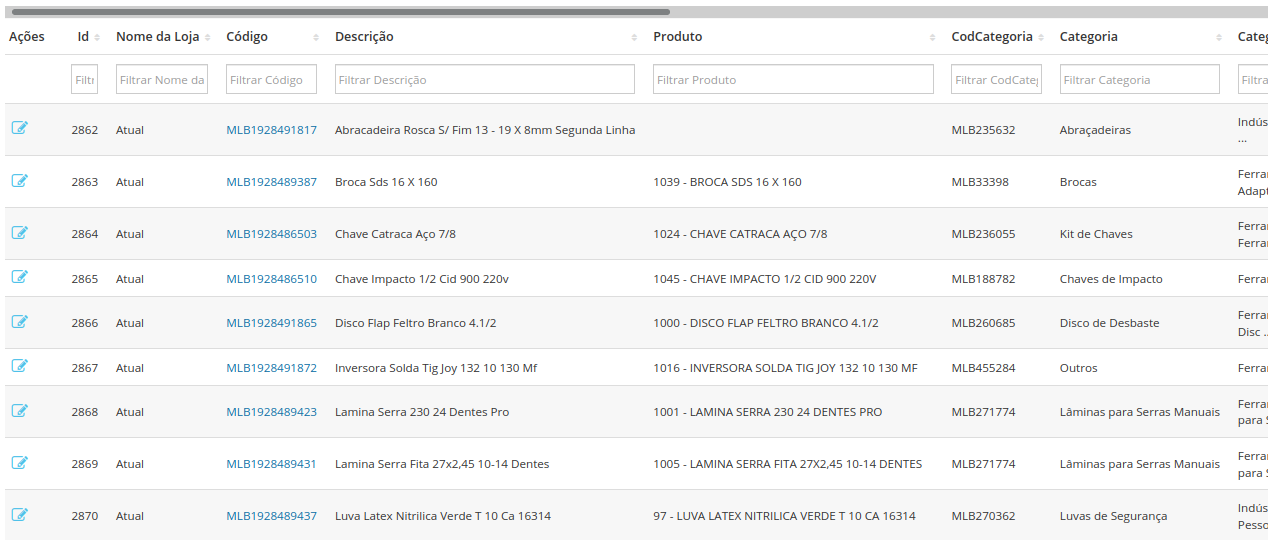
Linking product manual with advertisement:
Section titled “Linking product manual with advertisement:”Linking the ad with the product can be done manually on the Queries  Mercado Livre Ads. screen.
As shown in the image below, the user will associate the imported ad (Description) with a corresponding product (Product).