

Demander API - Send data to Demander
Method (POST) to send data to Demander.
| Property | Type | Required | Description |
| token | text | Yes | Company Token |
| arquivo | file | Yes | File in the Demander integration layout |
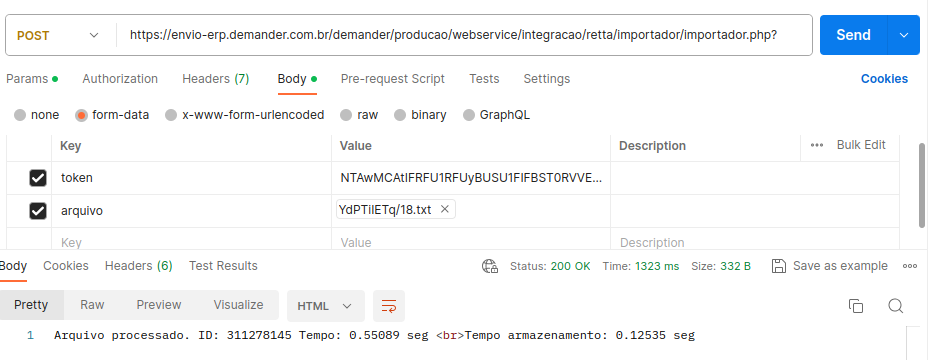
Example sending via Postman:
Messages that can be returned in the request
In some cases the request may return a message other than success (statuscode=200). Here we list some responses that the request may return:
- ERROR 01: No company found with Token $token!
- Check if the token passed as parameter is the same company token in Demander Web.
- ERROR 02: The company (Company Code - Company Legal Name - Company Trade Name) is not active in Demander!
- Check if the company is active in Demander Web.
- ERROR 03: Missing “arquivo” parameter.
- Check if any parameter is missing in the request.
- ERROR 03: Contact support to update the synchronizer version.
- Synchronizer version is too old; contact support or download a newer version at Downloads.
- ERROR 04 - UPLOAD PROBLEM
- ERROR 04 - The company (Company Code - Company Legal Name) is not configured to accept requests from MAC: $MacRecebido
- Check in Company Settings, Integration tab, if the option “Validate MAC control when uploading files via synchronizer” is checked. If so, the machine’s MAC address must be provided. If not, MAC validation is skipped.
- ERROR 05: Defaulting company.
- Contact Demander’s financial department.
- ERROR 08: Company outside trial period.
- Check the company’s trial period expiration date. Contact support for more details.
- DATA INCONSISTENCY ERROR
- When data is sent back to Demander, validations run to ensure consistency. There are several messages indicating inconsistencies in the uploaded file, for example: error on line X: The record is not valid, check if there is an unexpected line break in your file. In this case, the file could not be processed due to an unexpected line break.
- There are other similar messages reporting data inconsistency, helping identify issues in Orders that were sent to the ERP, modified, and returned to Demander. All values must match (order total, item totals, taxes, quantities, etc.).
- ERRORS (500, 502, 503, 504)
- 5xx errors are related to lack of communication with the server. Check your internet connection or contact support.