

How to force sending and searching data from the Integrated Store?
On the [Integrated Store Configuration] screen (https://sistema.demander.com.br/dinamico/configuracao-loja-integrada) some icons are shown, which can be seen in the image below.
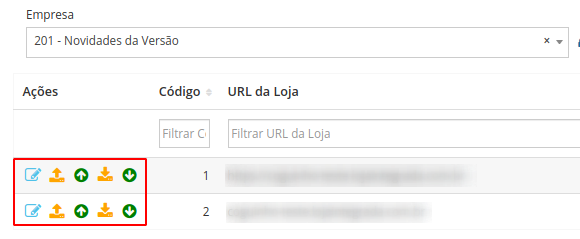

- Edit the record (By clicking you will be taken to the screen with configuration information for the integration with the Integrated Store)

- Execute sending (Sends information to the Integrated Store. See our article Information that the Demander sends to the Integrated Store for more details)

- Simulate sending (Performs a simulation with the data to be sent to the Integrated Store, generates a log of this data for consultation, but does not send it to the Integrated Store. The idea of Simulation is to identify a problem or check what will be sent before actually sending it to the Integrated Store). When clicking this button you are redirected to the Detailed Log screen where a message is displayed informing that the execution of this simulation has been scheduled, so it may happen that the last Log that appears on the screen is not the one sent at that moment, so wait a few seconds and refresh the page to ensure that the Log that will be displayed is the correct one.

- Execute search (Performs a search for information from the Integrated Store. See our article on Information that Demander searches in the Integrated Store for more details)

- Simulate search (Performs a simulation with the data to be searched from the Integrated Store, the data searched in this simulation is not inserted into the Demander, only a Log is generated with this data. The idea of this Simulation is to identify a problem or check what will be searched before actually carrying out the search and saving the data in the Demander). When clicking this button you are redirected to the Detailed Log screen where a message is displayed informing that the execution of this simulation has been scheduled, so it may happen that the last Log that appears on the screen is not the one sent at that moment, so wait a few seconds and refresh the page to ensure that the Log that will be displayed is the correct one.
All these Logs are saved on the Integrated Store Integration Logs screen, to better understand how to consult and understand these Logs, access our article How to consult Integrated Store integration logs?