Demander API — Fetch data from Demander (ERP export)
This webservice (GET method) lets the ERP or custom integration fetch recent changes from Demander and download an export file. Demander is not “pushing” data: the client queries the endpoint and processes the returned file. For new real-time integrations, prefer the REST API — it uses different authentication (API Token), not this webservice’s company token.
https://busca-erp.demander.com.br/demander/producao/webservice/integracao/retta/exportacao_dados.php?token={company token}&periodoInicial={format YYYY-MM-DD HH:MM}
| Property | Type | Required | Description |
|---|---|---|---|
| token | text | Yes | Company token (same as synchronizer / legacy webservices). How to generate. Not the REST API Token. |
| periodoInicial | datetime | Yes | Date and time from which you want to fetch Demander information. Format YYYY-MM-DD HH:MM. The webservice builds a file with changes made in Demander from that moment (subject to the limits below). |
This call returns a file URL. Download and process that file in the ERP.
Like the outbound layout, the fetch/export layout uses | as the field separator.
When NOT to use
Section titled “When NOT to use”- If the company uses Demander’s official synchronizer, it already runs this fetch on a schedule — you usually do not need to call this webservice manually day to day.
- For new or real-time integrations, prefer the REST API instead of this legacy file-export webservice.
Important limits for custom integrations
Section titled “Important limits for custom integrations”These rules mainly apply to custom integrations (direct webservice/API). The official Demander synchronizer already controls how often searches run; the periodoInicial clamp usually only appears if the search has not run for more than 7 days.
1) periodoInicial limit (7 days)
Section titled “1) periodoInicial limit (7 days)”If periodoInicial is older than 7 days relative to today, it is ignored and replaced with today − 7 days.
In practice: asking for “everything since 2020” will not work — Demander limits the change-search window.
2) Orders returned (30 days by issue date)
Section titled “2) Orders returned (30 days by issue date)”Besides the change filter, orders are only returned when issue date (dataEmissao) is within the last 30 days:
Pedido.dataAlteracao > {periodoInicial}AND Pedido.dataEmissao > {today - 30 days}Orders with an issue date older than 30 days are not returned in this fetch, even if they were changed recently.
What you should do
Section titled “What you should do”- Persist the timestamp returned in the file and send it as
periodoInicialon the next call. - Run the fetch frequently (ideally daily or continuously) so you stay inside the 7-day window.
- Do not use continuous export to reprocess a long historical backlog.
- If you use the official synchronizer, keep it running; it already avoids most of these cases.
File contents
Section titled “File contents”The first line of the downloaded file contains metadata:

Save that date/time in the ERP and pass it as periodoInicial on the next call.
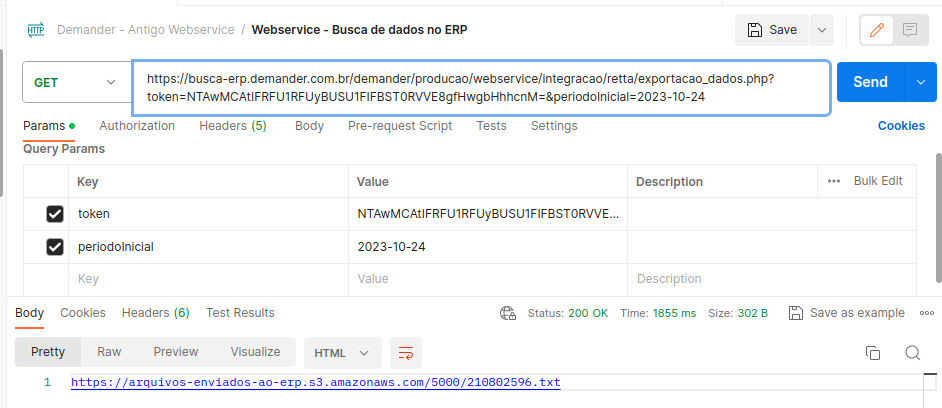
Postman example: