Demander’s integration with Bling
About Bling!
Bling is a 100% Online ERP.
Attention: Bling is not a Demander product, it is a product developed by another company with which Demander can be integrated.
Bling Hiring
Section titled “Bling Hiring”You are responsible for making the contract directly with Bling, this can be done directly on the websitehttps://www.bling.com.br/planos-e-precos.
NOTE: It is important to highlight that the API for integration is only available from the Cobalt Plan.
What information is integrated?
Section titled “What information is integrated?”Basically, Demander’s integration with Bling will send and fetch data from the Bling API.
In the articles below you can see in detail what is integrated:
* Information that Demander sends to Bling
* Information that Demander searches for on Bling How to configure the integration?
Read our article Setting up Bling integration.
Restrictions and considerations:
Section titled “Restrictions and considerations:”1 - Only plans from the “Cobalt” plan onwards have access to the integration API
Section titled “1 - Only plans from the “Cobalt” plan onwards have access to the integration API”Plans lower than the “Cobalt” Plan do not allow integration.
2 - The integration is compatible with customers who already use Bling and who have a plan from “Cobalt”
Section titled “2 - The integration is compatible with customers who already use Bling and who have a plan from “Cobalt””If the Company already uses Bling, it is possible to integrate with Demander, as long as the Company has a plan that has access to the Bling API.
3 - Bling has limited storage spaces.
Section titled “3 - Bling has limited storage spaces.”Each Bling plan has a limited amount of storage, for example, in the “Cobalt” plan this limit is 60mb.
4 - Duplicate CPF/CNPJ
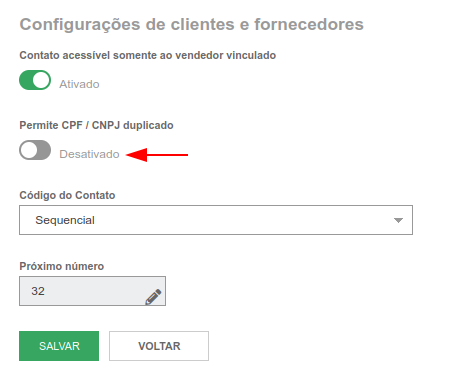
Section titled “4 - Duplicate CPF/CNPJ”Even though it allows you to register directly in the ERP, Bling’s API does not allow you to send different contact registrations with the same CPF/CNPJ. For better integration, it is important that the company analyzes the registrations and keeps the duplicate CPF/CNPJ permission disabled. (Access HERE this configuration)
5 - Customer Codes according to Bling
Section titled “5 - Customer Codes according to Bling”In the image above, you can see the Contact Code field in Bling. Keep the type set to Sequential, as Demander customers will receive the same code generated in Bling, avoiding duplication.
We also have the option for Demander to generate the codes sequentially when importing Customers, for this see the configuration related to this in Bling integration configuration.
6 - Seller Codes according to Bling The code for each seller imported into Demander will also have the same code as their respective contact on Bling.
7 - Product Code according to Bling
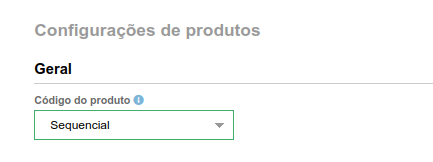
Section titled “7 - Product Code according to Bling”On Demander, products will also use the Bling code. Just like clients, keep the setting to “Sequential”.
(Access HERE this configuration)