

How to link customers to salespeople and control the portfolio
This article explains how linking customers to salespeople works in Demander, and how to control which customers each salesperson can view and serve.
Linking a customer to a salesperson
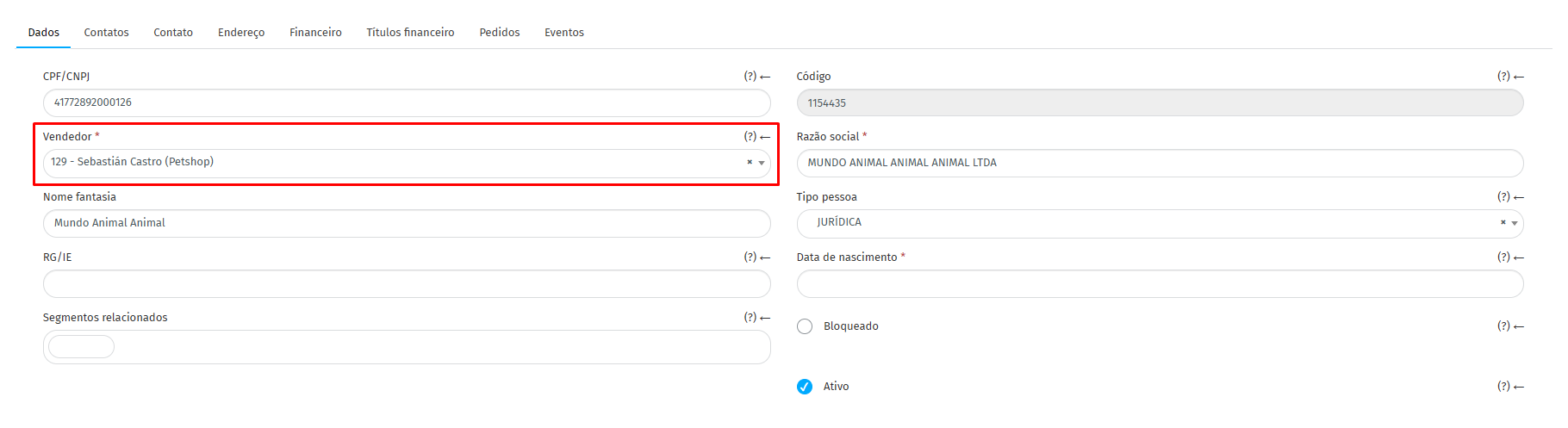
Section titled “Linking a customer to a salesperson”In the customer registration (Cadastros → Clientes), under the Dados (or General) tab, the Vendedor (Salesperson) field defines which salesperson is associated with the customer. When this field is filled, the customer appears only for the selected salesperson. If the field is left blank, the customer appears for all salespeople.
Linking more than one salesperson to the same customer
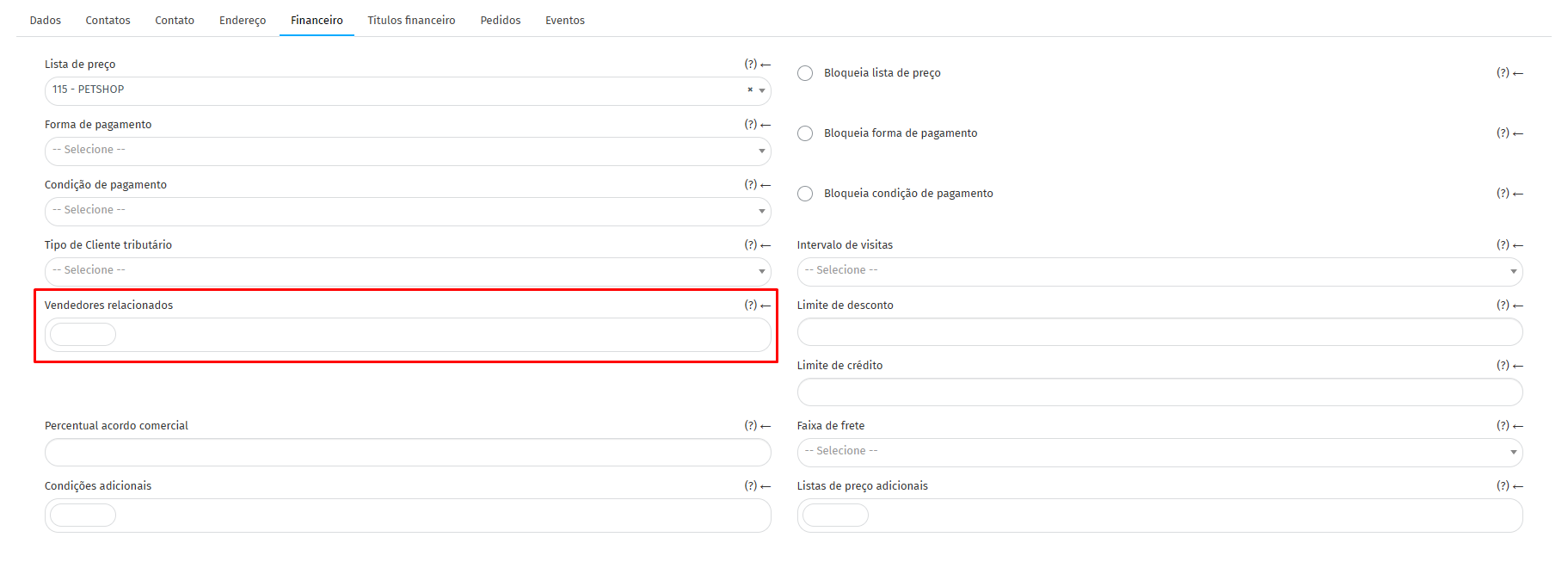
Section titled “Linking more than one salesperson to the same customer”Under the Financeiro (Financial) tab in the customer registration, the Vendedores relacionados (Related salespeople) field allows associating other salespeople with the same customer, for cases where more than one person needs to serve or view that customer.
Controlling orders for other salespeople’s customers
Section titled “Controlling orders for other salespeople’s customers”In the salesperson registration (Cadastros → Vendedores), under the Configuração (Configuration) tab, the Regra para emissão de pedidos para clientes de outro vendedor (Rule for issuing orders to customers of another salesperson) field defines whether that salesperson can place orders for a customer linked to a colleague.
The options are:
- Conforme configuração da empresa (According to company settings): follows the global rule defined for the company;
- Somente para clientes ativos (Active customers only): the salesperson can only place orders for active customers of other salespeople;
- Tanto ativos quanto inativos (Both active and inactive): the salesperson can place orders for any customer of other salespeople;
- Somente inativos (Inactive only): the salesperson can only place orders for inactive customers from colleagues’ portfolios;
- Nunca (Never): the salesperson is not allowed to place orders for customers linked to other salespeople.

This rule is what effectively controls the portfolio boundaries of each salesperson.
For companies with integration
Section titled “For companies with integration”Companies that use integrations can transmit this same information via layout:
- In table 18 - Customers, the
codVendedorfield defines the primary salesperson and thevendedoresRelacionadosfield receives the additional salesperson codes separated by commas, which is only necessary when more than one salesperson serves the customer. - It is worth noting that if a salesperson registers a new customer directly through Demander, only the primary salesperson is automatically filled.
- In table 02 - Salespeople, the
regraPedidoClienteOutroVendedorfield allows configuring the Rule for issuing orders to customers of another salesperson via integration.
Summary
Section titled “Summary”- The Vendedor field in the customer registration defines the primary responsible representative.
- The Vendedores relacionados field allows multiple salespeople to serve the same customer.
- The Vendas para Clientes de Outros Vendedores (or Regra para emissão de pedidos para clientes de outro vendedor) option in the salesperson registration controls whether they can place orders for colleagues’ customers.