

Which reports are available for salespeople and managers?
This article explains which reports are available in Demander Mobile for salespeople and managers, and how to enable this feature.
Reports in Demander Mobile
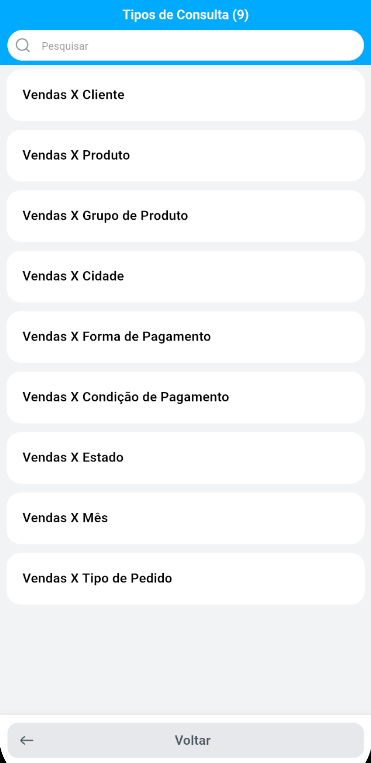
Section titled “Reports in Demander Mobile”In the app, the salesperson has access to nine query types: Sales x Customer (Vendas x Cliente), Sales x Product (Vendas x Produto), Sales x Product Group (Vendas x Grupo de Produto), Sales x City (Vendas x Cidade), Sales x Payment Method (Vendas x Forma de Pagamento), Sales x Payment Term (Vendas x Condição de Pagamento), Sales x State (Vendas x Estado), Sales x Month (Vendas x Mês), and Sales x Order Type (Vendas x Tipo de Pedido).
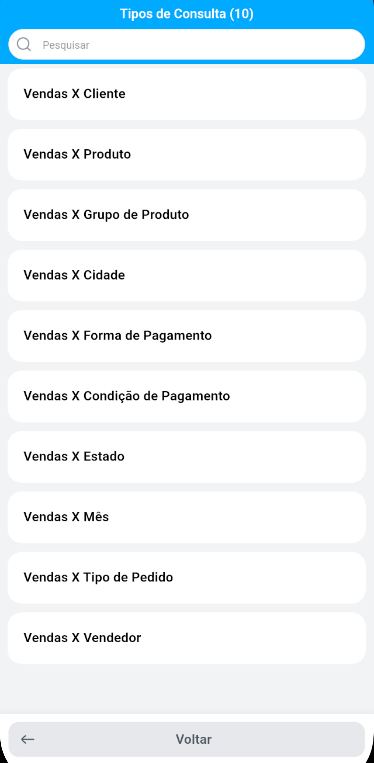
The manager has access to the same nine query types, plus an additional report: Sales x Salesperson (Vendas x Vendedor), which allows consulting sales by team salesperson.
Enabling reports in Demander Mobile
Section titled “Enabling reports in Demander Mobile”For the reports button to appear in the app, you need to enable the Tornar visível o botão Relatórios no Demander mobile (Make the Reports button visible in Demander mobile) option under Company Settings, Additional Settings tab.

Reports in Demander Web
Section titled “Reports in Demander Web”In Demander Web, each report is released individually via User Groups. Reports checked for the group will be displayed to the user.