

1. Mapping your first order with PlugSales
To place orders through PlugSales, it is necessary to map the operations. These operations are performed directly by PlugBot in its data system (bank or text files), and they are:
- Insert the new order;
- Consult ID of the new order;
- Add items to the new order.
Note: If you have not yet mapped the other PlugSales features, we suggest you read the following articles before proceeding with Order mapping: - How to map users? - How to map products? - How to map customers? - How to map payment methods? - How to map financial data? - How to map commissions?
To start configuring these operations, you must access the ORDER tab.
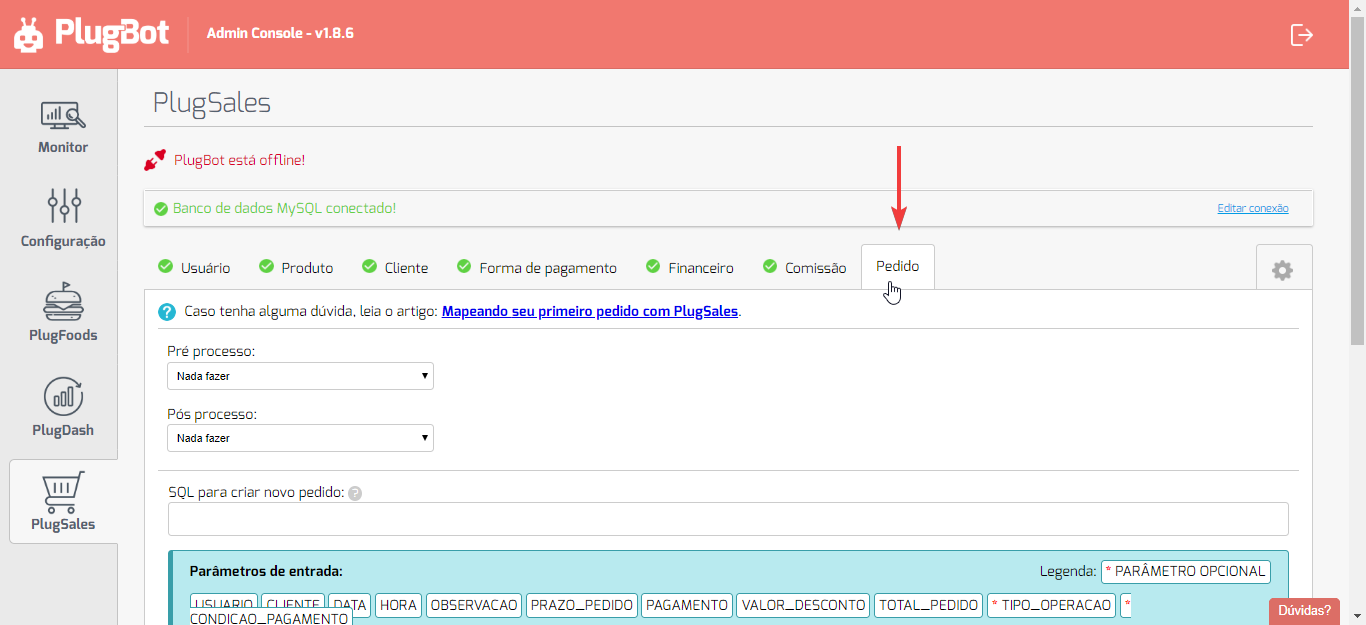
SQL to create new order
Section titled “SQL to create new order”This SQL will be executed whenever a new order is issued by the PlugSales application and it is sent to the PlugMobile Cloud (if you have an internet connection).
For the insertion of the new order to be carried out correctly, SQL must receive the parameters sent from the application.
Parameters sent by the application:
Section titled “Parameters sent by the application:”- USER*(integer)*
- This parameter returns the ID of the user issuing the order (seller).
- The ID returned will be the same as that entered in the USER. tab
- CLIENT (whole number)
- This parameter returns the ID of the customer selected in the order.
- The ID returned in this parameter will be the same as that entered in the [CLIENT] tab (/en/plugsales/02-plugsales-dados-sobre-os-clientes/573623-plugsales-como-mapear-clientes/).
- DATE (text)
- This parameter returns the order date in the format YYYY-MM-DD.
- The date returned in this parameter will be in accordance with the date selected in the order.
- TIME*(text)*
- This parameter returns the order time in the format HH:MM.
- The time returned in this parameter will be in accordance with the time selected in the order.
- NOTE*(text)*
- This parameter returns the observations that the user may have made for the order.
- ORDER_DEADLINE (text)
- This parameter returns the order deadline defined by the seller at the time of sale.
- PAYMENT (real number)
- This parameter returns the ID of the payment method selected in the order.
- The ID returned in this parameter will be the same as that entered in the [PAYMENT METHOD] tab (/en/plugsales/07-plugsales-formas-de-pagamento/573624-como-mapear-formas-de-pagamento/).
- DISCOUNT_VALUE (real number)
- This parameter returns the discount amount granted for this order.
- TOTAL_ORDER (real number)
- This parameter returns the total order value.
- TABLETABLE *(whole number) *(OPTIONAL)
- If you use price tables, this parameter returns the ID of the price table selected at the time of issuing the order.
- OPERATION_TYPE*(integer)*(OPTIONAL)
- If you use operation type, this parameter returns the ID of the operation selected when issuing the order.
- PAYMENT_CONDITION*(integer)*(OPTIONAL)
- If you use payment terms, this parameter returns the ID of the payment term selected when issuing the quote.
- NEW_BALANCE*(real number)*(OPTIONAL)
- If you use balance to control user discounts, this parameter will provide the seller’s updated balance after placing an order.
- The balance amount will be the same as configured in BALANCE PER USER.
As these parameters are sent from the PlugSales application to your PlugBot, the SQL you enter to insert the new order has access to them.
You can use them to store this information in your database. See below an example of SQL for inserting a new order:/* Example in a MySQL database */ INSERT INTO TbPedidos (user_id, customer_id, order_date, time, observation, payment_form_id, discount_value, total_order_value, price_table_id) values ([USER], [CUSTOMER], ‘[DATE]’, ‘[TIME]’, ‘[OBSERVATION]’, [PAYMENT], [VALUE_DESCONTO], [TOTAL_ORDER], [TABELAPRECO])Note: parameters that are of type texto must be enclosed in “quotes” (or ‘apostrophe’, depending on the syntax of your database) and if the special characters **’ “ | **, line breaks or emojis are identified in these parameters, they will be removed to avoid conflicts with some integration means.
Is it possible to add custom fields when placing an order?
“SQL to query ORDER_ID of the new order”
Section titled ““SQL to query ORDER_ID of the new order””After PlugBot has inserted the new order into your bank, it is necessary to know the ID of that order so that you can add the items using the same value in the order ID.
To do this, enter the SQL that returns the ID of the last order entered. The return of this SQL needs to be** a record with a **column: “ORDER_ID”.
In situations where the order table ID is a numeric field with auto increment, the SQL could be:
/* Example in a MySQL database */ SELECT id AS ID_PEDIDO FROM TbPedidos ORDER BY id DESC LIMIT 1
“SQL to insert items into the order”
Section titled ““SQL to insert items into the order””With the order inserted in the bank and your ID in hand, it is time for PlugBot to receive the items from that order and insert them into the bank.
To do this, SQL has access to the following parameters that are sent from the application:
- ORDER_ID (integer)
- This field must inform the order ID that the item belongs to.
- PRODUCT (integer)
- This field must inform the ID of the product that this item refers to.
- QUANTITY (numeric)
- This field must inform the quantity ordered for this product.
- UNIT_VALUE (real number)
- This field must inform the unit price of the item’s product.
- DISCOUNT_VALUE (real number)
- This field must inform the discount amount granted to this item.
- TOTAL_VALUE (real number)
- This field must inform the total value of this item, which is obtained from the unit value, discount value and quantity purchased.
- NOTE (text)
- This field must inform the observations of this product.
- PRICE_TABLE (whole number)(OPTIONAL)
- If you use price tables with the possibility of choosing products from different tables, this field must inform the ID of the price table that this item refers to.
-** OPTION_ID (integer)(OPTIONAL)**
- If you use product options, this field must inform the ID of the option chosen for the product that will be added, configured in OPTIONS FOR PRODUCTS.
-** ID_GRADE (integer number ) (OPTIONAL)
- If you use product grid tables, this field must inform the ID of the chosen grid of the product that will be added, configured in PRODUCT GRID.
The SQL executed for this function could be as follows:
/* Example in a MySQL database */ INSERT INTO TbItensPedido (order_id, product_id, qty, vlr_unit, vlr_desc, vlr_total, observation, price_table) VALUES ([ORDER_ID], [PRODUCT], [QUANTITY], [UNIT_VALUE], [DISCOUNT_VALUE], [TOTAL_VALUE], ‘[OBSERVACAO]’, [TABELA_PRECO])**Note:parameters that are of type text must be enclosed in “quotes” (or ‘apostrophe’, depending on the syntax of your database) and if the special characters ’ “ | \ , line breaks or emojis **, they will be removed to avoid conflicts with any means of integration.
After making the above settings, click on “Save ORDER Settings”.