

3. PlugSales input errors
This guide presents the main insertion errors that can prevent PlugSales/PlugBot from working correctly and how to identify and correct each of them.
Insertion errors in PlugSales
Section titled “Insertion errors in PlugSales”SQL syntax error
Section titled “SQL syntax error”The syntax error is one of the most common. It occurs when there is an incorrect character or command in the SQL query.
A simple example is the presence of a “;” before the word VALUES, which is enough to prevent the insertion of a customer, order or quote.
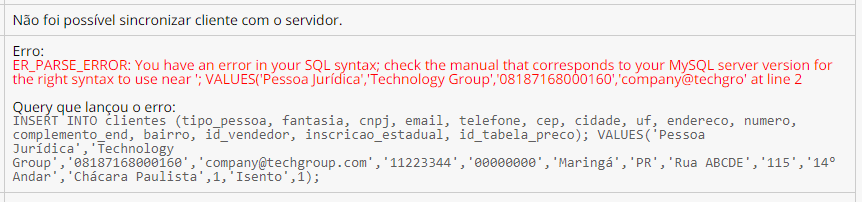
When encountering this error:
- Check that the INSERT syntax is correct.
- Check that there are no inappropriate characters.
- Make sure string values are enclosed in single quotes (‘’).
- Numeric fields must not contain quotation marks.
If you have difficulty locating the error, copy the query and run it directly against the database. Many DBMSs indicate exactly where the error is, making it easier to correct.
Data type error
Section titled “Data type error”Data type errors are also quite common and generally occur when the type of information sent does not match the type of the field in the database.

Each PlugBot parameter returns a specific type of data. This information can be viewed by positioning the mouse over the parameter in PlugBot.
Check that:
- String fields are being inserted into string fields.
- Numeric fields are being inserted into INT, FLOAT or similar fields.
- Dates are in the format expected by the bank.
A simple way to validate is to copy the query and execute it directly in the database.
Parameters used
Section titled “Parameters used”Another important point is to validate whether the number of parameters corresponds to the number of fields entered in the INSERT.

Example:
- 8 fields entered
- 9 parameters sent
This will cause insertion error.
Also check:
- Whether the parameter names are correct
- If there are no typing errors
- Whether custom parameters are configured correctly
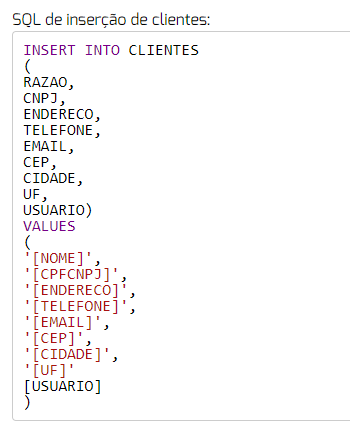

Important: Parameters must always be described in capital letters.
Database fields
Section titled “Database fields”Typing errors in field names are also common. Therefore, validate:
- If the field actually exists in the database
- If the name is spelled correctly
- If the field matches the value that will be entered
String fields and character size
Section titled “String fields and character size”In string type fields (VARCHAR), it is common for an error to occur when the size of the value sent is greater than that allowed by the field.
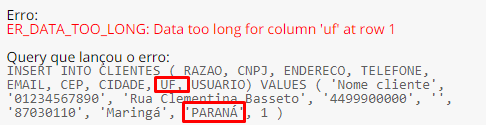
Example: If a field is varchar(20), it supports a maximum of 20 characters. If the query tries to insert a value longer than 20 characters, an error will occur.
Another example:
- UF field in the bank: varchar(2)
- Amount sent: “PARANÁ” (6 characters)
This will generate an insertion error.
To fix:
-
Adjust field size in database or
-
Use SUBSTRING to send only the allowed number of characters
Special bank conditions
Section titled “Special bank conditions”Some banks have additional rules, such as:
- Mandatory NOT NULL fields
- Insertion procedures
- Automatic triggers
- Internal validations
In these cases, it is necessary to check whether all mandatory data is being sent correctly.
If any information is missing, adapt the insertion SQL to meet all the requirements of the table or function performed.
If, after these validations, the error persists, we recommend running the query directly on the database to more precisely identify the cause and make the necessary adjustments.