

How to synchronize budgets? (PlugSales)
After carrying out the integration with your database, you have the possibility of enabling your PlugBot to start synchronizing your budgets, that is, all budgets that are created in the application will be saved in your database.
Firstly, you must go to the Settings ⚙ tab, and enable the option** Do you want to synchronize budgets?
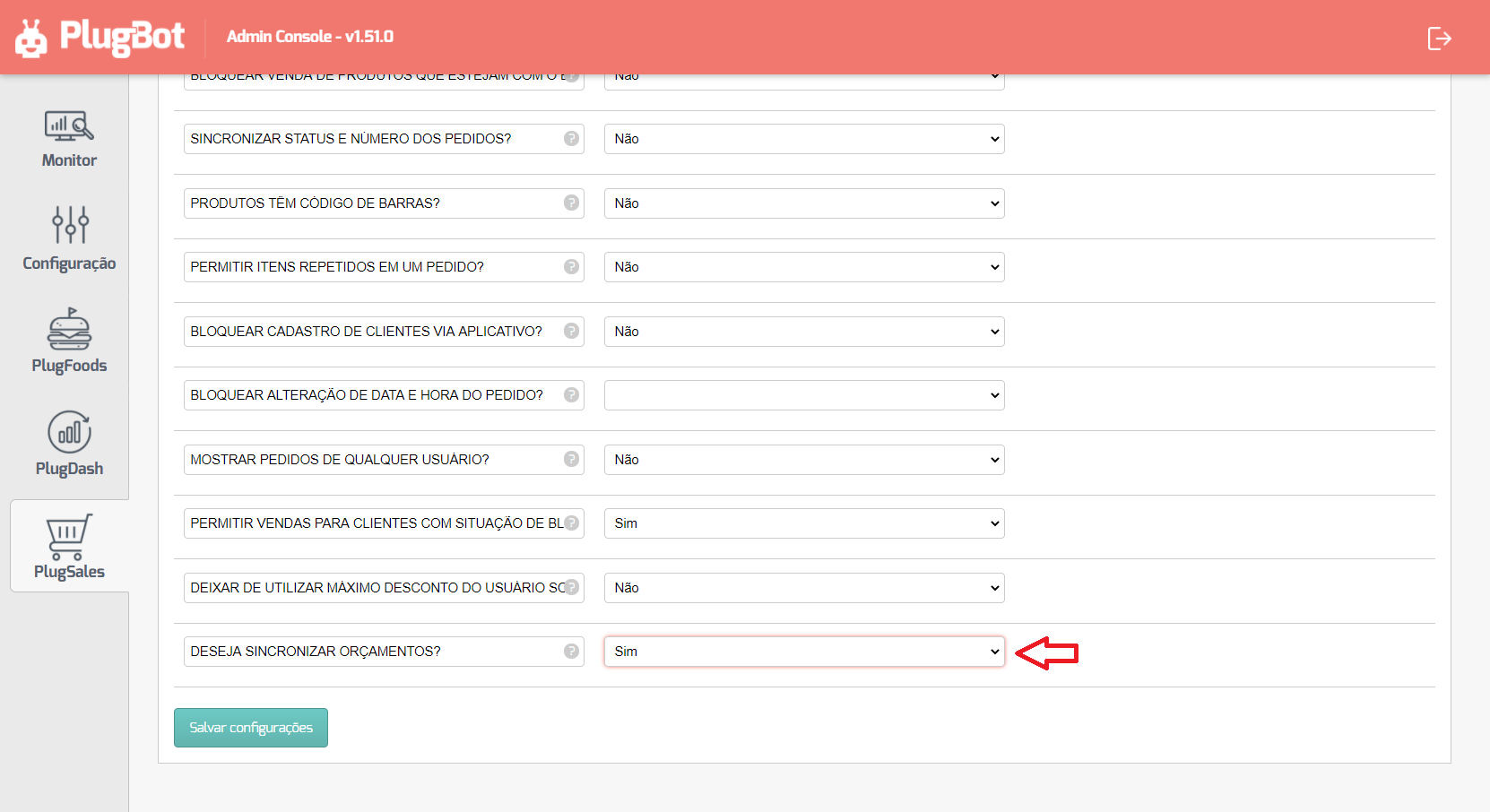
With the option enabled, a new Budget tab will be available to be configured.
SQL to create new budget
Section titled “SQL to create new budget”This query will be executed whenever a new quote is issued or when a quote that has already been synchronized is changed by the PlugSales application, and it is sent to the PlugMobile Cloud (if you have an internet connection).
For budget insertion to be carried out correctly, SQL must receive the parameters sent from the application.
Parameters sent by the application:
- USER*(integer)*
- This parameter returns the ID of the user issuing the order (seller).
- The ID returned will be the same as that entered in the USER. tab
- CLIENT (whole number)
- This parameter returns the ID of the customer selected in the order.
- The ID returned in this parameter will be the same as that entered in the [CLIENT] tab (/en/parceiros/plugsales/02-plugsales-dados-sobre-os-clientes/573623-plugsales-como-mapear-clientes/).
- DATE (text)
- This parameter returns the order date in the format YYYY-MM-DD.
- The date returned in this parameter will be in accordance with the date selected in the budget.
- TIME*(text)*
- This parameter returns the order time in the format HH:MM.
- The time returned in this parameter will be in accordance with the time selected in the quote.
- NOTE*(text)*
- This parameter returns the observations that the user may have made for the budget.
- BUDGE_DEADLINE (text)
- This parameter returns the deadline that the user can budget for.
- PAYMENT (real number)
- This parameter returns the ID of the payment method selected in the quote.
- The ID returned in this parameter will be the same as that entered in the [PAYMENT METHOD] tab (/en/parceiros/plugsales/07-plugsales-formas-de-pagamento/573624-como-mapear-formas-de-pagamento/).
- DISCOUNT_VALUE (real number)
- This parameter returns the discount amount granted for this budget.
- TOTAL_BUDGET (real number)
- This parameter returns the total budget amount.
- BUDGET (whole number)
- This parameter returns the budget ID saved in the PlugMobile Cloud.
- If the budget is changed, a new record will be created in your database and this parameter can be used to identify records that were created by the same budget.
- VERSION (whole number)
- This parameter returns the budget version.
- If it is a new budget, this field will have the value 0.
- If a change is made to the budget, this field will be increased.
- PAYMENT_CONDITION*(whole number)* (OPTIONAL)
- If you use payment terms, this parameter returns the ID of the payment term selected when issuing the quote.
- TABLETABLE *(whole number) *(OPTIONAL)
- If you use price tables, this parameter returns the ID of the price table selected when issuing the quote.
- TYPE_OPERATION (integer) (OPTIONAL)
- If you use operation type, this parameter returns the ID of the operation selected when issuing the quote.
See below an example of SQL for inserting budgets:
/* Example in a MySQL database */ INSERT INTO budgets(budget_id, user_id, customer_id, date, time, observation, order_deadline, operation_type, payment, discount_amount, order_total, version) VALUES (‘[BUDGET]’, [USER], [CUSTOMER], ‘[DATE]’, ‘[TIME]’, ‘[OBSERVATION]’, ‘[PRAZO_ORCAMENTO]’, ‘[TYPE_OPERATION]’, [PAYMENT ], ‘[VALUE_DISCOUNT]’, ‘[TOTAL_ORCAMENTO]’, [VERSION])
SQL to query BUDGE_ID of the new budget
Section titled “SQL to query BUDGE_ID of the new budget”This query will be used to search for the ID of the last budget entered and use it to add the items for that budget.
The return of this query must be a single record with the ORDER_ID property.
/* Example in a MySQL databaseConsidering that table orcamentos has a column id of numeric type with auto increment. */SELECT id AS BUDGE_ID FROM budgets ORDER BY id DESC LIMIT 1
SQL to insert items into the budget
Section titled “SQL to insert items into the budget”This query will be used to insert budget items.
Parameters sent by the application:
- BUDGE_ID (integer)
- This field must inform the ID of the budget that the item belongs to.
- PRODUCT (integer)
- This field must inform the ID of the product that this item refers to.
- QUANTITY (whole number)
- This field must inform the quantity ordered for this product.
- UNIT_VALUE (real number)
- This field must inform the unit price of the item’s product.
- DISCOUNT_VALUE (real number)
- This field must inform the discount amount granted to this item.
- TOTAL_VALUE (real number)
- This field must inform the total value of this item, which is obtained from the unit value, discount value and quantity purchased.
- NOTE (text)
- This field must inform the observations of this product.
- PRICE_TABLE (whole number) (OPTIONAL)
- If you use price tables with the possibility of choosing products from different tables, this field must inform the ID of the price table that this item refers to.
- OPTION_ID*(integer)*(OPTIONAL)
- If you use product options, this field must inform the ID of the option chosen for the product that will be added, configured in OPTIONS FOR PRODUCTS.
See below an example of SQL for inserting items:
/* Example in a MySQL database */ INSERT INTO budget_items (budget_id, product_id, quantity, unit_value, desc_value, total_value, observation, price_table) VALUES ([Quote_ID], [PRODUCT], [QUANTITY], [UNIT_VALUE], [DISCOUNT_VALUE], [TOTAL_VALUE], ‘[NOTE]’, [PRICE_TABLE])
SQL to update budget that was deleted
Section titled “SQL to update budget that was deleted”If a budget is deleted in the application, this query will be executed so that you can update the budget with this information.
Parameters sent by the application:
- BUDGE_ID (integer)
- This field must inform the ID of the budget that was deleted.
/* Example in a MySQL database */ UPDATE budgets SET observation = ‘DESCARTED’ WHERE id = [ID_ORCAMENTO]