

How to Inactivate a Company?
In Demander Web, the partner can inactivate a company. It will also be possible to do this process with the Partner API.
How to inactivate a company
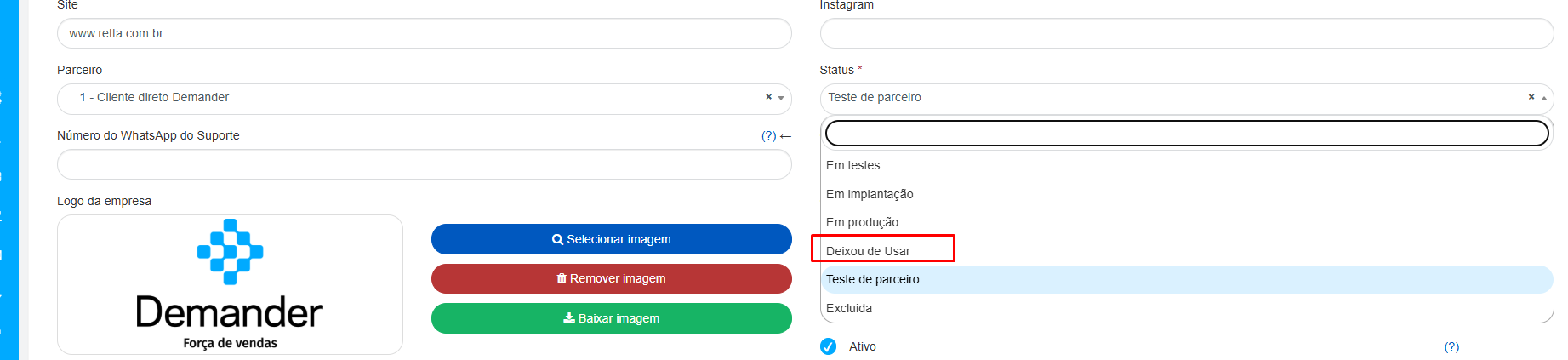
Section titled “How to inactivate a company”To inactivate a company, you can perform the action directly on Demander Web in Registrations  Companies. In edit company, you will have the option to activate or inactivate a company, as shown in the figure below.
For complete inactivation, in addition to deselecting the Active field, the Status field must be set to “No longer used”.
How to reactivate a company (partner)
Section titled “How to reactivate a company (partner)”When the status is No longer used, you (partner) can start using the company again in the same registration: edit the company, select Active if it is cleared, and change Status to Implementation or Production.
- Production: the company operates again. Licensing and billing apply as described in the Billing policy.
- Implementation: the trial end date still applies. If that date has already passed, access stays blocked until the period is extended — see How to extend the trial period.
You cannot switch back to In trial or Partner trial from this screen. Deleted status is also not reactivated here.
Partner API
Section titled “Partner API”The Partner API is for exclusive use by Demander partners. It aims to facilitate this and many other administrative processes for our partners in relation to their customers. Try using it. Check out the documentation at the link: Partner API.