

Partner API
This article introduces the Partner API.
Introduction
Section titled “Introduction”The Partner API is a set of methods that allows you to query, create and change partner companies.
NOTE: Note that the Partner API does not allow the integration of records such as customers and products from each company.
Presentation Video
Section titled “Presentation Video”API Methods
Section titled “API Methods”The Partner API offers the following methods:
- Get list of companies:
- Returns a list of all partner companies.
- Create new company:
- Allows the creation of a new company.
- Change company
- Allows you to change a company’s registration data.
- Billing statement
- Returns the details of the billing statement for a given month.
Frequently Asked Questions
Section titled “Frequently Asked Questions”How to get partner token?
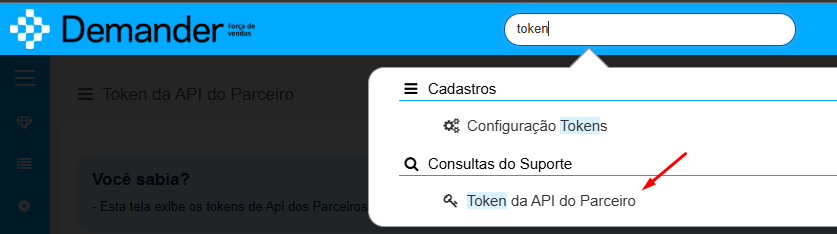
Section titled “How to get partner token?”To obtain your partner token, go to the menu Queries > Partner API Token:

How to test the API?
Section titled “How to test the API?”To facilitate testing, we created a collection that you can import directly into Postman.
Collection Link: https://www.getpostman.com/collections/0e1ecc7e1a0ef56a9e42
NOTE: We suggest using Postman directly on the web: https://www.postman.com/, just create the account and import the collection, configure your token and test the API.
How is this API different from the integration we already have in each company?
Section titled “How is this API different from the integration we already have in each company?”They are two different things:
- The integration of each company (using the Integration and Synchronizer Layout) allows the integration of data tables for a given company, in this case the Company Token is used.
- The Partner API in turn allows consultation, modification and creation of new companies.
Can I use the partner token in the Synchronizer?
Section titled “Can I use the partner token in the Synchronizer?”No, the sync needs a company token.
Can I use my testing company’s token in the Partner API?
Section titled “Can I use my testing company’s token in the Partner API?”No, the Partner API needs a Partner Token.