Creating a view to map commissions (PlugSales)
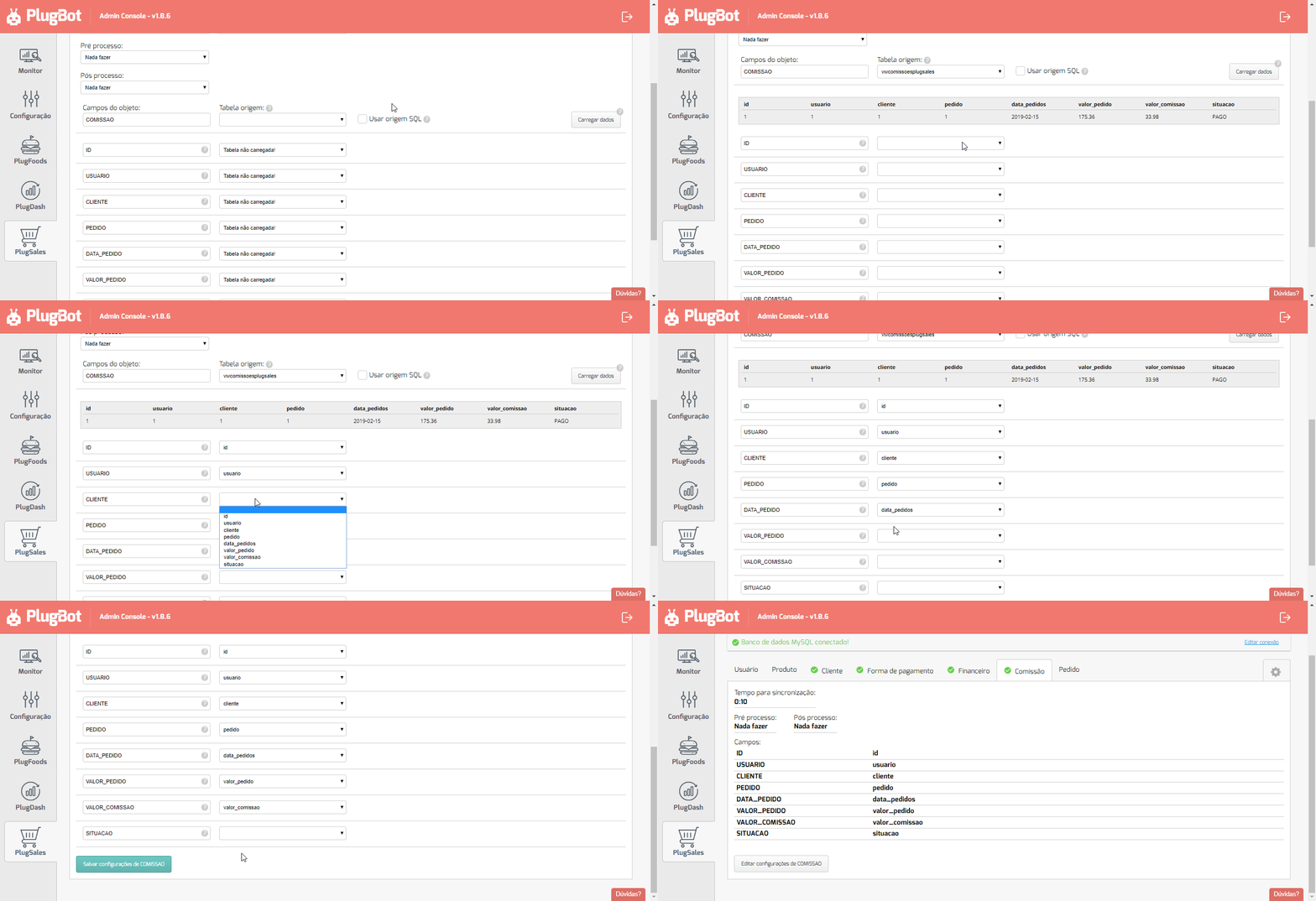
Commissions on PlugSales must have the following information:
- ID
- Numeric field of type inteiro that identifies this user’s commission. This field is not returned in the application, as this information is for consultation purposes only.
- USER
- Number field of type inteiro with the user ID, this value must be the same as that entered in User mapping.
- CLIENT
- Number field of type inteiro with the customer ID, this value must be the same as that entered in Customer mapping.
- REQUEST
- texto field containing a value to identify the seller’s order, this field will be displayed in a column in the list of commission orders.
- ORDER_DATE
- texto field with the account due date in the format:YYYY-MM-DD.
- ORDER_VALUE
- Numeric field of type real(float/decimal) with the value of the order that generated this commission.
- COMMISSION_VALUE
- Numeric field of type real(float/decimal) with the commission value.
- SITUATION
- texto field with commission status .
To adapt to the PlugSales format, it is not necessary for you to create a new commission table with these columns and start registering from scratch.
Just create a view in your database, which will return records with the columns needed by PlugSales.
What is a view?
Section titled “What is a view?”In practice, a view is a virtual table in which its records are the results of a SELECT defined at the time of its creation.
For example, to create a view that simulates a table that displays only VIP customers:
CREATE VIEW ClientesVIP AS SELECT FirstName1, LastName1 FROM Customers WHERE VIP = ‘S’;
And the query from VIP customers about this view would simply be:
SELECT * FROMClientsVIP;
Creating a Commissions view for PlugSales
Section titled “Creating a Commissions view for PlugSales”Example: MySQL
Section titled “Example: MySQL”To create the commissions view that PlugSales needs, imagine that you have the following structure in your database:
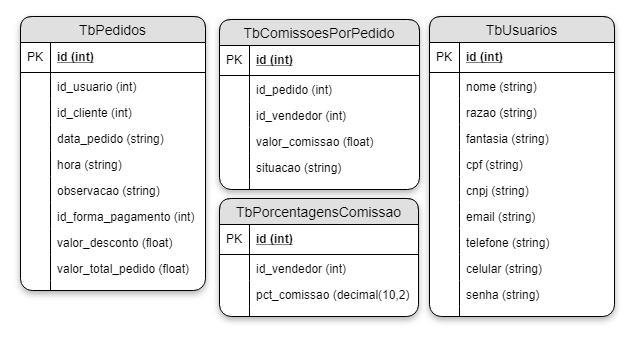
PlugSales needs information that is, in this scenario, in different tables in the database.
To resolve this and give PlugSales the information it needs about commissions, you can write a SQL query passing alias names to the columns with inner joins to aggregate the tables, which will need to be executed every time PlugBot needs to read commission information.
Or you can create a view that will bring the data in the correct format all at once to PlugSales.
To create view that serves PlugSales in this table structure, the SQL would be as follows:
CREATE OR REPLACE VIEW VwComissoesPlugSales AS SELECT cpp.id, p.id_usuario AS user, p.id_cliente AS client, p.id AS request, p.data_pedido, p.valor_total_pedido AS valor_pedido, cpp.valor_comissao, cpp.situacao_comissao AS situacao FROM tbcomissoesporpedido cpp INNER JOIN tbpedidos p ON cpp.id_pedido = p.id;
Once the VwComissoesPlugSales view is created, you can select that view in the dashboard and PlugBot can simply perform a simple SELECT * FROM VwComissoesPlugSales to obtain the necessary data.
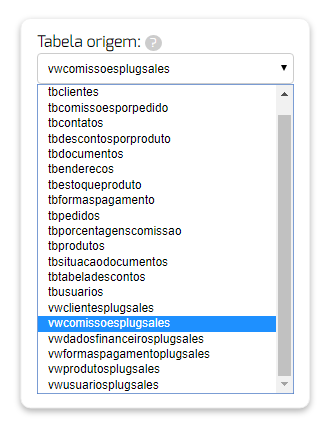
And when loading the data from this view, whether directly from the table, or using an SQL query, the data will already be formatted correctly in the columns that PlugSales expects!