

How to map payment methods? (PlugSales)
The payment method is used to issue the order, defining what the customer’s payment method will be.
*Payment method mapping is mandatory.
To map payment methods in PlugSales, each record must have the following fields:
- ID
- Numeric field of type inteiro that identifies the type of payment.
- This field is returned in the request.
- NAME
- texto field with the name of the payment method.
- Examples: Cash, Credit Card, Slip.
Note: For these fields to be reported correctly, we recommend creating a specific view and entering it in the PlugBot panel.
Read: Creating a view to map payment methods
To start configuring payment methods, define the interval at which PlugBot should synchronize user records from your system to your PlugSales.
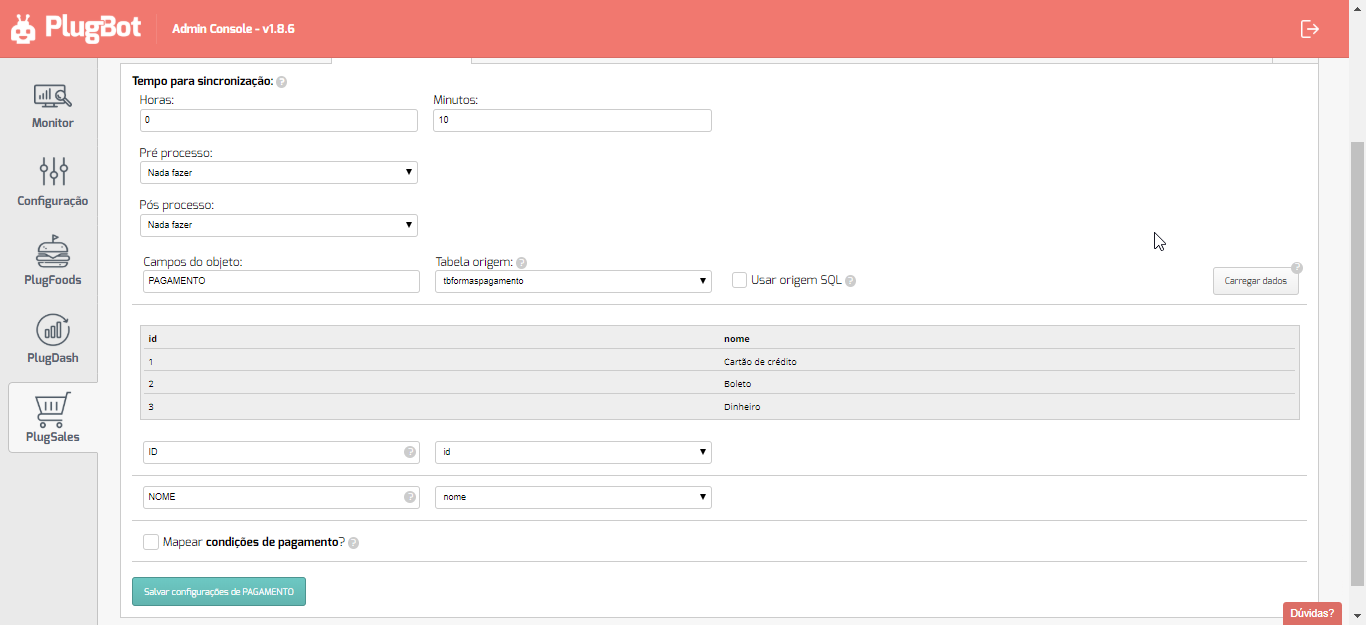
Note: We recommend using at least 10 minutes
After selecting the source Table or entering the SQL Source, click “Load data”.
With the data loaded, you can begin the field mapping process, following the instructions for each field.
Note: If you want to activate payment terms, access the following post: Mapping payment terms
With all fields mapped, click “Save PAYMENT Settings” at the bottom of the screen.