

How does placing orders work for customers registered on the app? (PlugSales)
It is very common in PlugSales to need to register customers at the time of sale, thus sending both registrations to your database. However, for this flow to be completed within our platform, it is necessary to carry out some steps configured in PlugBot.
When a customer registers on PlugSales, and then issues an order to that same customer, it is common for the order status to have the following information:
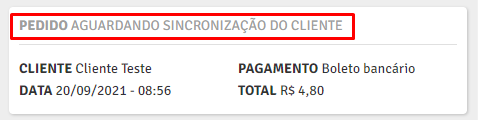
This message means that the order registration is waiting for the customer to synchronize!
What does this mean exactly?
Customer synchronization refers to importing this record into your database. In other words, the application is waiting for the newly registered customer to be inserted into their bank, and thus completing the synchronization process. However, after inserting this record into its database, the application needs feedback from PlugBot to know whether this record was actually synchronized successfully.
Okay, and how does this work?
For the application to have this confirmation, it needs to receive this client’s registration again through the client loads made periodically through the query configured in the clients tab, according to the configured synchronization time.
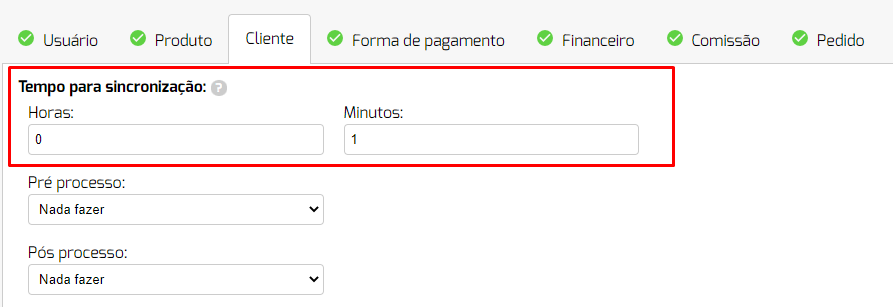

As shown in the images above, PlugBot runs the customer query every 1 minute, checking for new registrations. Therefore, after the application sends the customer registration to PlugBot, and it is inserted into its database, PlugBot needs to execute this customer query again to identify this new customer, and send the registration again to the application. In the application, it is necessary to receive this new synchronization from PlugBot, and this is done through the synchronizations that the application performs, through the synchronization button located on the app’s footer, when logging into the application and also when the new synchronizations message is made available on the app screen. For the application to identify and confirm this new registration as successful, a validation of the registered CPF/CNPJ is carried out, that is, when the application sends a registration with a specific CPF/CNPJ, confirmation from this same customer is made through the return of the same CPF/CNPJ coming from PlugBot.
After this entire process, the registration is confirmed by the application, and now the order registration will be sent to your database.
Some problems may occur in this flow, so if this occurs, always validate that the customer’s registration was entered into your database correctly, and that it is being returned to the application correctly, and especially with the same registered CPF/CNPJ. (If the CPF/CNPJ has masks with dots and dashes, this doesn’t interfere with synchronization).
If the customer registration has not yet arrived in your database, access the following documentation (Click here)
See below a video explaining and reviewing all the flows described above.