How to configure balance per user? (PlugSales)
The balance option provides the seller/user with the option to apply discount on the order according to the available balance. In the application, if the seller applies a discount to a specific order, the discounted amount is removed from your balance, the same occurs when an order is placed with an increase, in this case the balance receives an increase in accordance with the increase.
If a seller has a balance of R$100.00, and placed an order with a R$10.00 discount, the seller’s balance becomes R$90.00. Then the same seller placed a new order, and now applied a higher value of R$ 15.00 to the product, now its balance rose to R$ 105.00.
To configure this in PlugSales we must start with the seller/user table, where a new field will be available for us to configure (BALANCE), this field will receive the BALANCE of our seller.
Therefore, the BALANCE field must receive a numerical value referring to the balance in reais that the seller will have to apply to the orders.
Example:

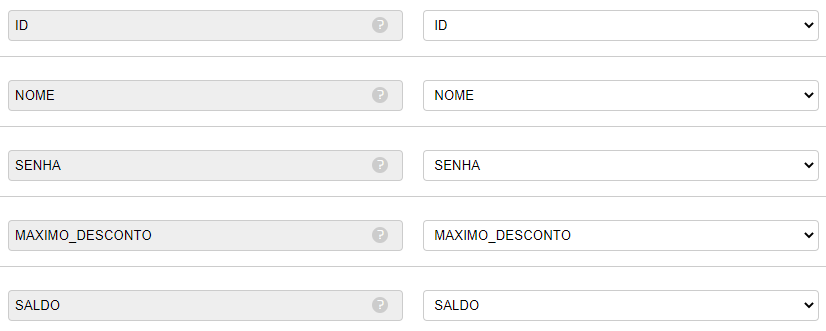
In my table the user has a balance of R$ 29.77
Then I will relate my BALANCE field with the PlugBot field.
Staying like this.
With our seller’s balance defined, we now need to configure the discount and balance increase, and to do this we need to access the ORDER tab.
In the orders tab, in the ‘SQL to create new order’ field, a new parameter (NEW_BALANCE) will be available. This parameter will provide us with the seller’s updated balance after placing an order.
Example: The seller had a balance of R$100.00, and when placing an order, he made a discount of R$10.00. This way, the seller’s new balance became R$90.00.
In other words, this new parameter will be used to change the seller’s balance after placing an order.
And how should we configure this?
In this field it will be necessary to use a PROCEDURE, and no longer an insert.
What should this procedure be like?
The procedure must perform two procedures, including the insertion of the order header (the same insert performed before), and the change in the seller’s balance.
See an example of the procedure!
NOTE: The example of the procedure below is using the MySQL database, the procedure format may vary according to your database.
– Creating the procedure
CREATE PROCEDURE SP_PEDIDO(
– Create all the variables that I will use
IN USUARIO INT,
IN CLIENTE INT,
IN DATA VARCHAR(50),
IN HORA VARCHAR(50),
IN PAGAMENTO INT,
IN VALOR_DESCONTO DECIMAL(10,2),
IN TOTAL_PEDIDO DECIMAL(10,2),
IN NOVO_SALDO DECIMAL(10,2) – Including the new balance
)
– Start the code that my procedure will use
BEGIN
– I configure the INSERT that will create the request in the bank
INSERT INTO orders
(user, customer, date, time, observation, payment, discount_value, total_order)
VALUES
(USER, CUSTOMER, ‘DATE’, ‘TIME’, ‘NOTE’, PAYMENT, DISCOUNT_VALUE, TOTAL_ORDER);
– And I do the UPDATE in my USER table, changing the seller’s new balance
UPDATE USUARIO SET BALDO = NOVO_SALDO WHERE ID = USUARIO;
With the procedure created, just use it in our new request SQL.

Okay, from now on, as soon as a new order is placed with a discount or increase, the seller’s balance will be updated through our procedure.
Take a look at how this all looks in the app.
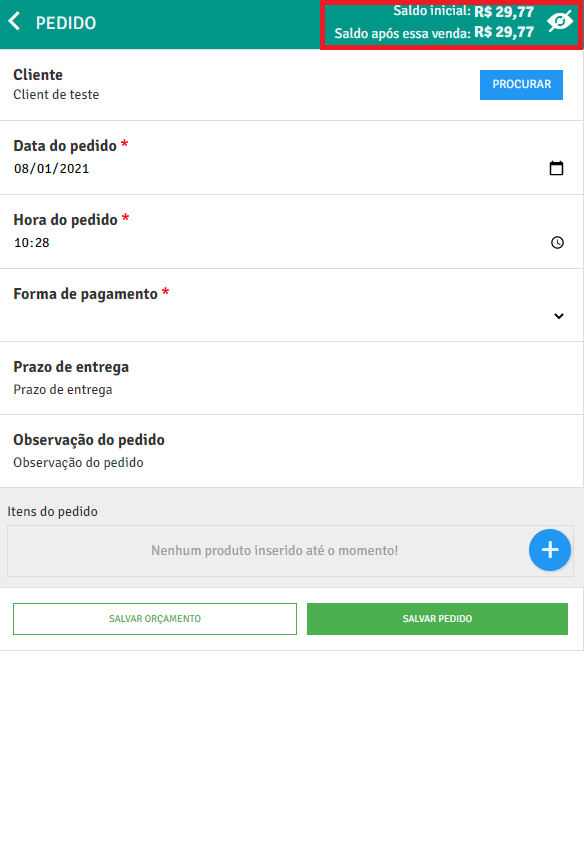
1 - When starting a new order, the seller’s balance will be displayed in the top corner of the application.
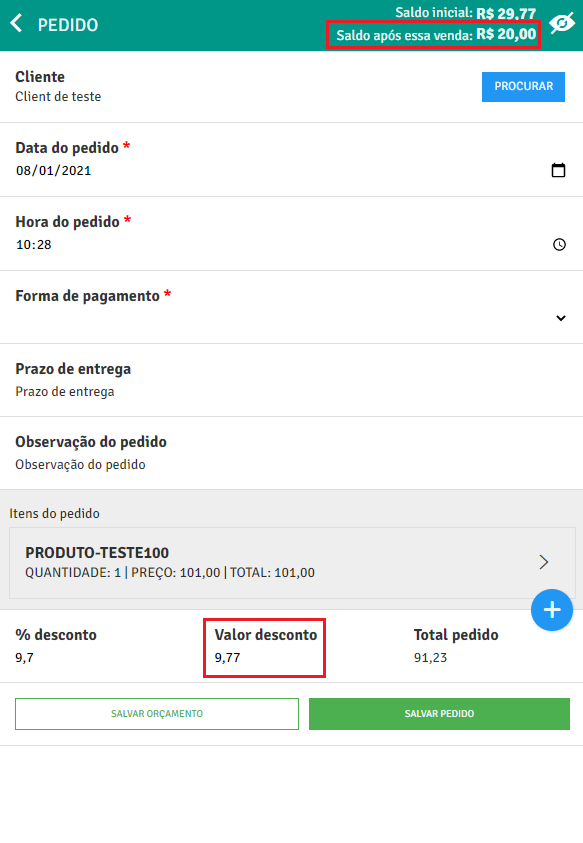
2 - If the seller applies a discount to the order, the balance amount will be automatically recalculated.
3 - Once the order is saved, the seller’s new balance will be updated to the new order.