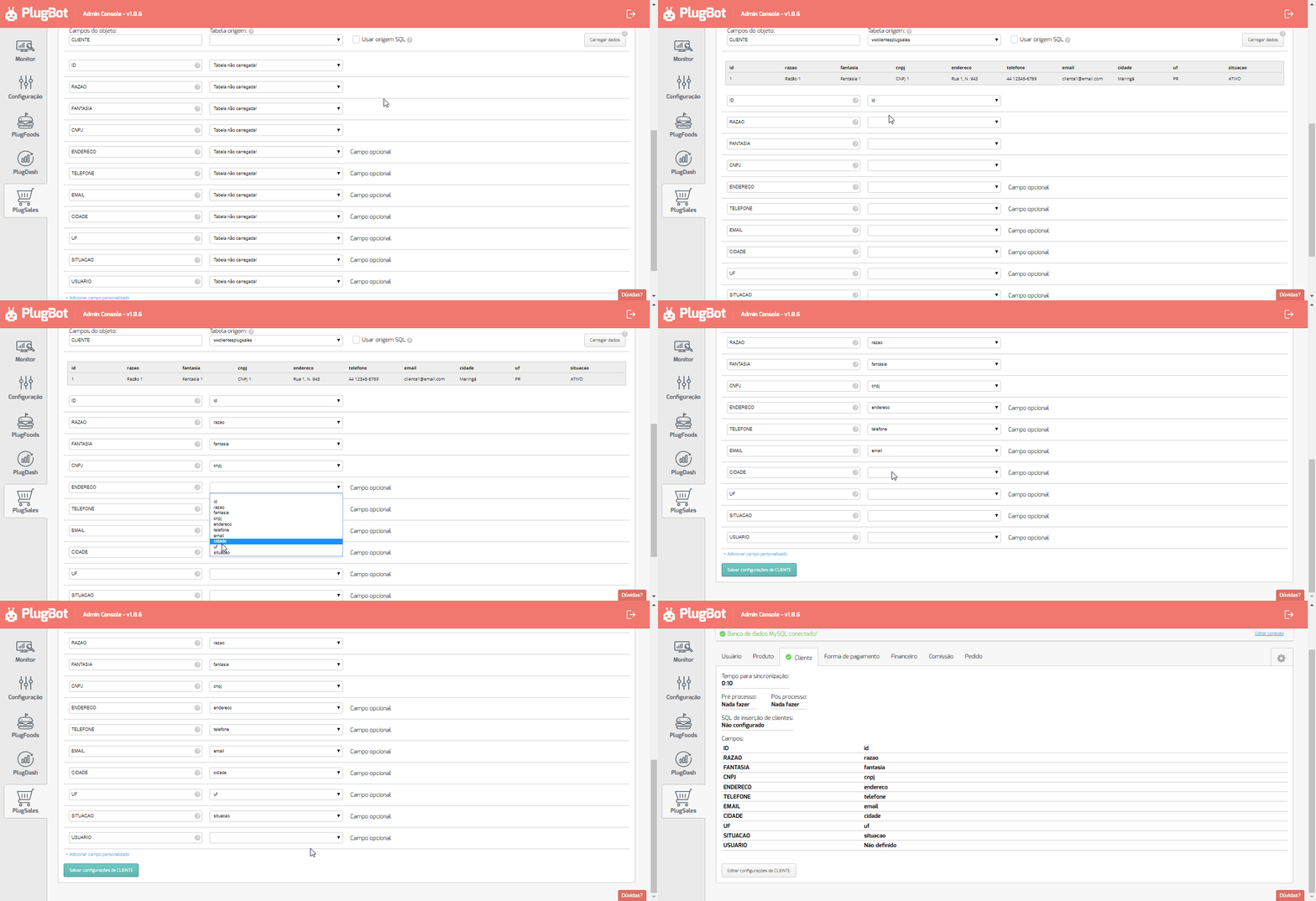
2. Creating a view to map customers (PlugSales)
This article aims to explain what customer information is mandatory in PlugSales and how to use a view to adapt your bank’s data to the necessary format.
In this article you will see:
- Required customer fields in PlugSales
- How to adapt your base without creating a new table
- What is a view
- Example of view creation
- How to create a customer view for PlugSales
Mandatory customer information
PlugSales customers need to have the following information for the integration to work correctly:
-
ID Integer numeric field. This field will be returned in the order and used to identify the customer.
-
REASON Text field with the customer’s business name.
-
FANTASY Text field with the customer’s business name.
-
CNPJ Text field with the customer’s CNPJ or CPF.
-
ADDRESS Text field with the customer’s address.
-
PHONE Text field with the customer’s phone number.
-
EMAIL Text field with the customer’s email.
-
CITY Text field with the customer’s city.
-
UF Text field with the customer’s status.
-
SITUATION Text field with the customer’s situation.
-
USER Integer numeric field with the user code linked to the customer.
Do I need to create a new customer table?
No.
To adapt to the format required by PlugSales, it is not necessary to create a new customer table or redo the registrations.
Simply create a view in the database that returns records in the format expected by the system. This view will be used by PlugBot to read the information.
What is a view?
A view is a virtual table created from a SELECT command.
It does not physically store data. Instead, whenever queried, it returns the results defined at its creation.
Practical example
Section titled “Practical example”Imagine a view that returns only VIP customers:
CREATE VIEW ClientesVIP AS SELECT FirstName1, LastName1 FROM Customers WHERE VIP = ‘S’;
To consult this view:
SELECT * FROMClientsVIP;
Creating a customer view for PlugSales
Example in MySQL
Section titled “Example in MySQL”Consider a scenario where the required information is in different database tables.
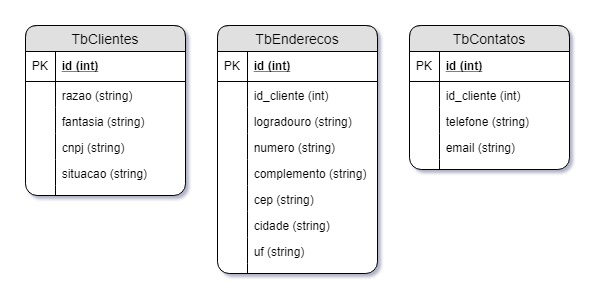
PlugSales needs to receive this data in a single result. To do this, you can create a view that brings together all the necessary information.
Example of view creation
Section titled “Example of view creation”CREATE OR REPLACE VIEW VwClientesPlugSales AS SELECT c.id, c.razao, c.fantasia, c.cnpj, CONCAT(e.logradouro, ’, N. ’, e.numero) address, co.telefone, co.email, e.cidade, e.uf, c.situacao FROM TbClientes c INNER JOIN TbAddresses e ON c.id = e.client_id INNER JOIN TbContacts co ON c.id = client_co.id;
In this example:
- Customer data is in different tables
- The view brings together all the necessary information
- Fields are returned in the format expected by PlugSales
Using the view in PlugBot
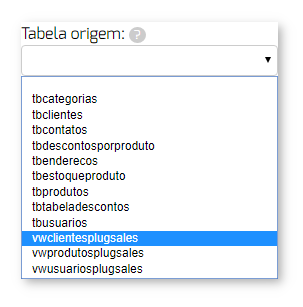
After creating the view, simply select it in the integration panel.
So PlugBot will run a simple query, like:
SELECT * FROM VwClientesPlugSales
This way:
- The data will now be returned in the correct format
- Mapping will be made easier
- Integration will occur in a safer and more organized way
When loading view data, whether directly from the table or via SQL query, the information will already be correctly structured in the columns expected by PlugSales.